Inspiring
April 16, 2019
Answered

Versaworks cutlines vs Illustrator CC 2019

  • April 16, 2019
  • 4 replies
  • 3078 views

Hey I was hoping some of you out there could help me with this issue.

I've been using versaworks and Illustrator for years now with no issues and recently my EPS files with cut lines have been hit or miss if Versaworks will recognize them or not. the files are all strictly vector, no raster images, no transparencies, & no layers.

I've tried saving as a pdf, recreating the files from scratch, flattening transparencies (even when there is none), outlining type, embedding type, saving as a earlier version of eps, upgrading my Operating system (previously windows 7 now windows 10), uninstalling Illustrator and re installing, initializing Versaworks again and nothing has worked.

For example, my project is to install some frosted vinyl on a window. Here is my initial file of just cut lines (File V1)

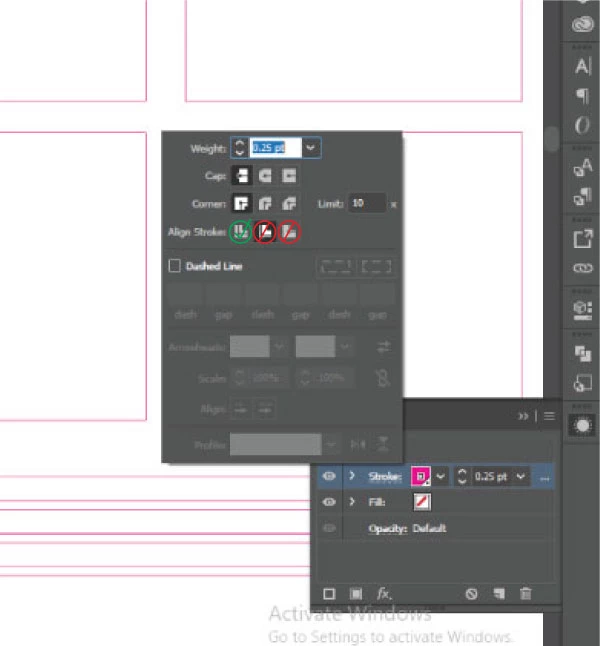
I sent this file to another print shop for help, and they adjusted my stroke to .25pt and said my stroke should never be 1pt (File V2) My versaworks still does not recognize the cut lines, however it works in theirs.

I recreated the file again (squares), made my stroke .25pt and now Versaworks recognizes only 3 of the 4 cut lines.

Here are the files

Dropbox - File V1.eps

Dropbox - file V2.eps

Dropbox - squares.eps 

Thanks in advance for your help!

This topic has been closed for replies.
Correct answer Uniq Edge

I'm posting this here in case anyone else in the future has this same issue.

Roland was able to solve it. My lines were all set to "align stroke to inside" instead of "align stroke to center".

4 replies

Uniq EdgeAuthorCorrect answer
Inspiring
April 24, 2019

I'm posting this here in case anyone else in the future has this same issue.

Roland was able to solve it. My lines were all set to "align stroke to inside" instead of "align stroke to center".

Participant
February 3, 2022

THANK YOU!!!! I've been trying to figure out why files sent by the designer would not show the cut lines in Versaworks!!! You are a gentleman and a scholar my friend haha


Kevin Stohlmeyer
Community Expert
Community Expert
April 16, 2019

Have you checked to make sure 540 is compatible with CC2019?

One option to try is to install CC2018 from the CC app (you can have both on your machine) and see if you still have the same issue that you do in CC2019.

Uniq EdgeAuthor
Inspiring
April 22, 2019

Hey,
I've tried running the 2018 version as well and same issue.
The file i sent to the print shop  and they redesigned it in CS6 and the cutline spot colour still never came through.

Roland responded to me so I'll see if I can trouble shoot with them.

Thank you for your help so far.

Kevin Stohlmeyer
Community Expert
Community Expert
April 16, 2019

Also there is a technical support document related to missing cut lines in Versaworks:

http://support.rolanddga.com/Docs/Documents/departments/Technical%20Services/Manuals%20and%20Guides/Troubleshooting_Vers…

Uniq EdgeAuthor
Inspiring
April 16, 2019

I The document is for Versaworks Dual.
I did go through the property settings though assuming it would be the same as the Versaworks original and everything seems to be in order as per the document.

Currently looking through their online tutorials to see if the answer is there.

Kevin Stohlmeyer
Community Expert
Community Expert
April 16, 2019

The current version of Versaworks is 6.

Kevin Stohlmeyer
Community Expert
Community Expert
April 16, 2019

What version of Veraworks and Illustrator are you using?

Have you checked for updates to Versaworks?

Uniq EdgeAuthor
Inspiring
April 16, 2019

I have it on automatic updates, and appears to be the most current one.

Versaworks -  5.5.1
Illustrator CC - 2019
Roland VS 540 - firmware 5.1