
Participating Frequently
July 7, 2018
Answered

Vertical Distribute Spacing to Horizontal Objects?

  • July 7, 2018
  • 3 replies
  • 2090 views

Hello! I haven't found any explanation to Illustrator's logic concerning the Vertical Distribute Space when it comes to Horizontal Objects, and viceversa.

Yes, those options are meant to be used when the objects are in the same position (Vertical distribution space to vertical objects and Horizontal distribution space to horizontal objects).

But still, I really want to understand the other way around (the opposite).

I attached a screenshot, in order to make myself more clear.
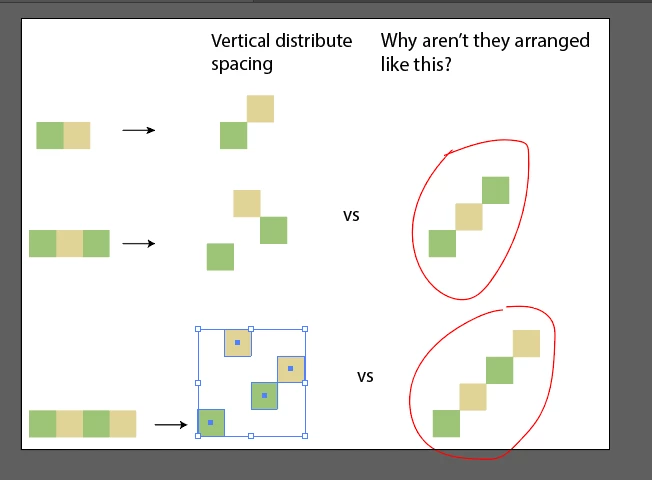
So, in the first row, seems pretty logic that those 2 cubes are arranged that way.

(I set the first cube the key object to all of the rows to be aligned accordingly)

But starting with the second row, why are they arranged that way?

I haven't set any spacing (it is 0 pt), so that the result is shown more clearly.

In the third column, I circled with the red ellipse what I think is the more logical result.

I know, they are not supposed to be arranged diagnonally, but the more objects you align, the more diagonal it gets.

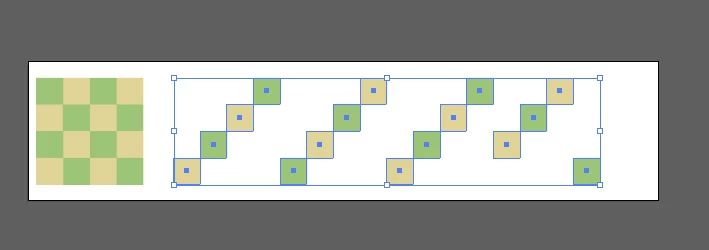
I attached another screenshot so that you can see how 16 cubes are arranged (with the first cube as a key object), but this time IN HORIZONTAL distribute spacing (it would have appeared the same way if I chose Vertical distribute spacing). The diagonal effect is on the left side, but the right side is an absolute mess. How come the right side is not arranged diagonally like the rest?
Thanks in advance!
    This topic has been closed for replies.
    Correct answer Kurt Gold

    3 replies

    Participating Frequently
    July 8, 2018

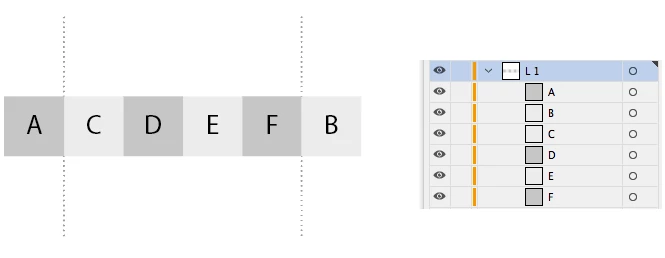
    Thank you! As I said, your example is the logic explanation, especially when it comes to my screenshot with the 16 squares. With the 4 squares in a row, I get different results everytime if I change the order or if I add another square to the row. I stick to your explanation, which is the standard logic of the program (the first and last ones are distributed to the extremes of the bounding box and what is left it is distributed evenly).

    Kurt Gold
    Community Expert
    Community Expert
    July 8, 2018

    Participating Frequently
    July 8, 2018

    Yes, I've done what you did, and it's weird how Illustratir gives different results with different shapes.

    With 7 ellipses the result is pure diagonal.

    But with fewer ones, the results are similar to those applied to squares.

    I tried with 7 squares to see if I get the same pure diagonal result, but I didn't.

    Another reason to leave this behind, as the mistery behind the logic increased even more.

    Thank you again for your time.

    Kurt Gold
    Community Expert
    Kurt GoldCommunity ExpertCorrect answer
    Community Expert
    July 7, 2018

    Jacob Bugge
    Community Expert
    Community Expert
    July 7, 2018

    Tina,

    Strange indeed.

    I am afraid you will have to make a slight rearrangement in any case, but you may (also) have a look at the astonishing ways the squares are arranged in the slanting rows (and the non row at the end), depending on their stacking order.

    You may try one version where the squares in each column are in reverse stacking order (bottom at top) and the columns are in normal order (left set of four squares at top), then create one where you start with the first column as before, then rotate a copy to form the next column, then repeat twice.

    Then you may try the horizontal spacing and click from top to bottom of each in the expanded Layer in the Layers palette and see which turn up where.

    Participating Frequently
    July 8, 2018

    Thank you, I tried to reverse the order for 4 squares that were in a row, and the results I get from Vertical distribution are different everytime.

    I even got them arranged diagonally in a particular order. So this is possible, with changing the order several times.

    I did this first (with 4 squares), because it was easier for me. But Kurt Gold's answer represents perfectly the program's logic. It fits the examples I gave in my screenshots. The first and the last one are distributed to the extremes of the bounding box and then, what's in the middle is distributed evenly. And this makes sense.

    Jacob Bugge
    Community Expert
    Community Expert
    July 8, 2018

    Tina,

    First of all, in post #2, Kurt demonstrates a case where the first and second squares (A and B) form the extremes/span with the others (C, D, E, F) in between, so in that case it is not the first and last as you have found in the case you mention.

    And that is far from all.

    For both the square of squares stacking orders described in the first post, the fourth last square, namely the bottom square (in the first one) and the top square square (in the second one) of the last column goes to the extreme left with the last three before it (in the general order), thus mangling the pattern in different ways.

    After a test with different numbers of squares in each column, the golden rule of squares and squares turns out to be that the distribution is spanned by the first squares in the first and last columns, first meaning first in the stacking order (of each column), so for a 4x4/3x3/2x2 square set it will be the very first and the fourth/third/second last square in the stacking order, all others distributed according to the general order.

    Sometimes, someone says that Illy moves in mysterious ways.