idolum
Inspiring
February 15, 2026
Question

View using GPU broke in 30.2?

  • February 15, 2026
  • 4 replies
  • 57 views

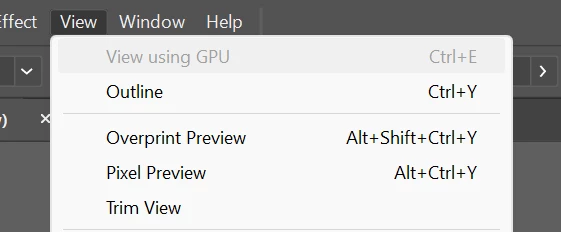
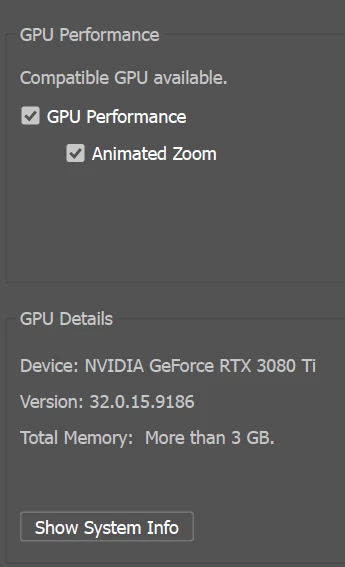
Did anyone else have ‘View using GPU’ break in Illustrator 30.2? Although a supported GPU is showing in Performance prefs and GPU+animated zoom are both turned on, the ‘View using GPU’ is greyed out in the pulldown menu and zooming is back to the old drag selection box.

I downgraded back to 30.1 on the same machine and it works fine.


    4 replies

    S2Maw
    Participant
    February 24, 2026

    Same here. After downgrading it works while the  30.2.1 has broken gpu support… I’m on a Nv 3090 GPU with the latest studio driver.

    idolum
    idolumAuthor
    Inspiring
    February 15, 2026

    Just remoted into my machine at work and downgraded to Illustrator 30.1; GPU zooming working fine. Re-update back to 30.2.1, GPU zooming broken.

    I also forgot to say in my original post I did already try wiping out my preferences (and in fact downgrading Illustrator did that for me, though luckily I have backups 😁)

    idolum
    idolumAuthor
    Inspiring
    February 15, 2026

    Well, both. My machine at home is running the GRD 591.86, and a different machine at the office is running the Studio driver 591.74, and neither are working right with Illustrator 30.2.1. I haven’t tried downgrading the one running the Studio driver to Illustrator 30.1 yet to see if it works again like my home machine.

    Anubhav M
    Community Manager
    Community Manager
    February 16, 2026

    Hello ​@idolum 


    I’m sorry to hear about your experience. We’ll need more information to help you with this scenario. Please reinstall Illustrator 30.2.1 and then collect the following information: 
    1. AiSniffer file:
    - Close all Adobe applications.
    - Navigate to the Illustrator Preferences folder and copy the AiSniffer file to the desktop from this location: 
    %USERPROFILE%\AppData\Roaming\Adobe\Adobe Illustrator 30 Settings\en_US\x64\
     
    2. For the System Report, kindly follow these steps:
    - Please press Windows Key + the letter "R" on your keyboard to bring up the Run command window
    - Type "msinfo32" in the Open field and left-click OK
    - While viewing the Microsoft System Information summary, go to File, then choose Save (Please do not use Export)
    - Save your MSINFO32 report as "msinfo32.nfo" on your desktop to easily locate it after. It can take up to a minute to generate a report.
     
    Kindly upload these files along with a sample AI file and a brief screen recording of the problem to Google Drive/Dropbox/etc. and share a public link here or via DM so that we can investigate this further.
     
    Looking forward to hearing from you.
    Anubhav

    idolum
    idolumAuthor
    Inspiring
    February 17, 2026

    Sent you a PM with a link. Thanks

    Community Expert
    February 15, 2026

    Is your computer running the Studio Driver or Game Ready Driver? Is it the latest version? I have the newest Studio Driver (v591.74 released Jan 6) running on my work desktop and notebook at home and both run the GPU accelerated view in Illustrator alright.