

MahaB82A
January 3, 2026
Answered

Visible & Invisible does not work properly

  • January 3, 2026
  • 3 replies
  • 904 views

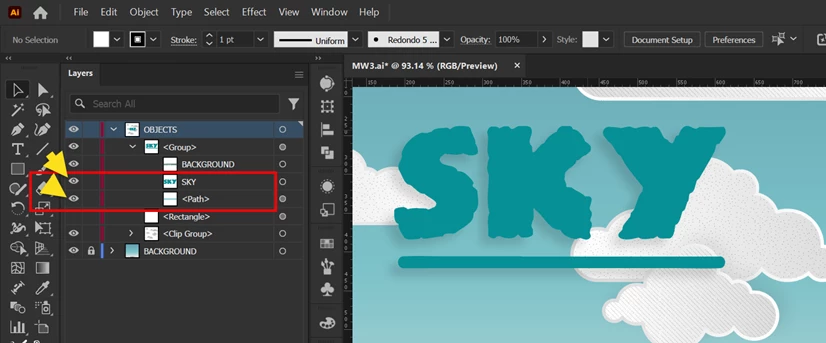
I downloaded this file from freepik. Hiding/Unhiding text does not work properly. What is the reason? file & video uploaded

43411-O3PZF9


2026-01-03_15-01-19.png


Correct answer Dave Creamer of IDEAS

I use Adobe CC Cleaner to uninstall Ai but it did not work.


I use SSD. I do not know what is meant by GRD.

2026-01-05_14-44-56.png


I tested it on my Windows computer and had the same problem as your movie showed (but worked on my Mac properly).

It seems to be related to putting the drop shadow on the entire group in the Appearance panel. 

When I put it on each object separately, the visibility worked properly. 

I sense a bug...


PS: NVIDA have two types of drivers: Game Ready Driver and Studio Driver.

3 replies

Dave Creamer of IDEAS
Community Expert
Community Expert
January 5, 2026

Did you reset the preferences?

What happens if you turn off GPU performance?


David Creamer: Community Expert (ACI and ACE 1995-2023)
MahaB82A
MahaB82AAuthor
January 5, 2026

I tried both of your recommendations but it did not work.

Dave Creamer of IDEAS
Community Expert
Community Expert
January 5, 2026

Can you upload the problem file? If you don't want it to upload it for everyone, click on my name and send me a message. Then I can send you my email. 


David Creamer: Community Expert (ACI and ACE 1995-2023)
barbara_a7746676
Community Expert
Community Expert
January 4, 2026

I am not able to reproduce this.

Monika Gause
Community Expert
Community Expert
January 3, 2026

Your video does not show. Precisely what does not work? PLease describe step by step.

MahaB82A
MahaB82AAuthor
January 3, 2026

Left side of the video shows there are layers & next to layers there are eye symbols. Which is there to hide & unhide layers. You can see if I hide the "sky" layer "sky" in the graphic area is hidden & again I unhide the layer, "sky" in the graphic area does not show. This is the issue.   

Monika Gause
Community Expert
Community Expert
January 4, 2026

I cannot reproduce that. Did you already reboot the computer?
