
ananth padmakarp64550037
Known Participant
October 9, 2017
Answered

want to open .ai file in illustrator using javascript

  • October 9, 2017
  • 14 replies
  • 7167 views

Hi.

i want to open a .ai file in illustrator using javascript.

1.my file structure is like this.
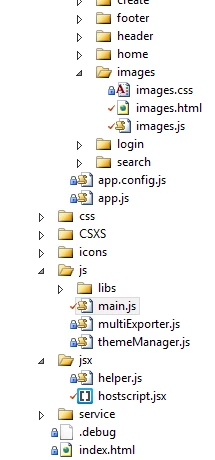
2.added script in main.js
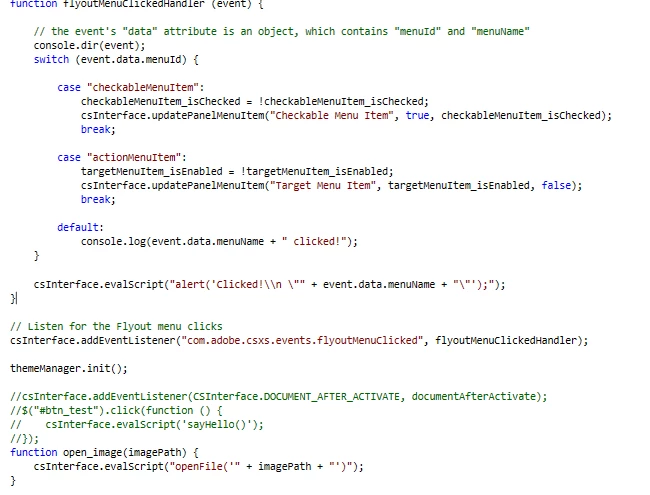
the code above the function open_image is developed before and i have added this function atlast.

3. code inserted in hostscript.jsx
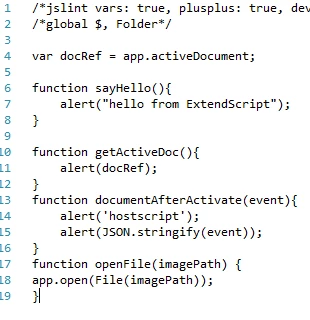
in the above file i have inserted the function openfile

4. now in html

<img ng-src="data:image/png;base64,{{item.imageByte}}"  onclick="open_image({{item.aIimagePath}});" class="hover" alt="..." data-toggle="tooltip" data-placement="top" title={{item.aIimagePath}}>

that is a image and upon clicking the image i need to open that ai file. and the item.alimagepath contains the path of the .ai file.

upon executing this an error occured stating that anonymous function.

could you please help me with this issue or how to open an .ai file.

This topic has been closed for replies.
Correct answer Silly-V

Well it's an angular error, so that needs to be fixed before anything can run. Do you have your remote debugger chrome inspector panel running?

14 replies

ananth padmakarp64550037
Known Participant
October 10, 2017

could Some one please help me with this...?

Silly-V
Legend
October 10, 2017

When you go to debug and inspect the elements, what is the html you see?

ananth padmakarp64550037
Known Participant
October 10, 2017

am getting the error after clicking it. what do you mean by the rendered html..?

ananth padmakarp64550037
Known Participant
October 9, 2017

Its a jquery click event

Silly-V
Legend
October 9, 2017

So what does you html look like when it's out put? Are you getting this error after clicking the click element, or loading?

Can you do a screenshot of the rendered html in your debugger?

Silly-V
Legend
October 9, 2017

See if you're not missing quotes around the open_image function's argument. You have them in place for the jsx part openFile function, but not for the open_image's ng onclick one.

onclick="open_image('{{item.aIimagePath}}');"

ananth padmakarp64550037
Known Participant
October 9, 2017

i have tried you answer but again the same error persists.

Silly-V
Legend
October 9, 2017

What about, should it be ng-click instead of click?