
Answered
Warning Pop-Up: This Text was Created in a Different Version of Illustrator
Yesterday I created a very simple, small file in Illustrator. Today I opened it, and immediately noticed that my text was acting strangly. Most of my text was suddenly not visible. I can see the text box, but the text is not visible.

When I double click on the text, I got the following screen:
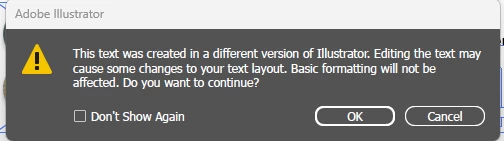
That's odd. I did not save this file any differently than I normally do, and I'm using the most updated version.
Upon further investigation, I found that when I changed the font, the text suddenly became visible again.

The previously mentioned font that was not showing up is Myriad Pro, a standard downloaded font. Why is it suddenly being shy? And why/HOW was this file "created in a different version" of Illustrator?
Thanks in advance!!!
 AdChoices