
Participant
July 21, 2023
Question

Warp two words

  • July 21, 2023
  • 2 replies
  • 304 views

Hello dear forum,

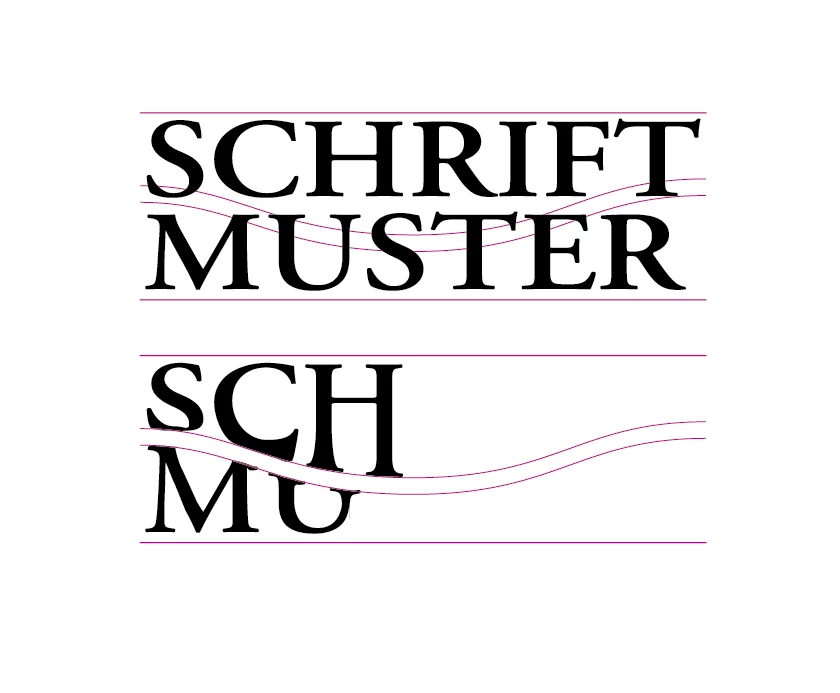
I would like to warp two words that are on top of each other in a wavy way.

However, the upper line of the first word and the lower line of the 2nd word should remain unchanged. I made a picture so you know what I mean...

What is the most elegant way to do this? It doesn't work satisfactorily with the Free Transform tool... does anyone have a solution on the best way to do this?

I would be forever indebted to you! 🙂
This topic has been closed for replies.

2 replies

kphotopage
Legend
July 21, 2023

Andreas, Hi.


I would use Object>Envelope as Monica suggested.

Here are the steps I used.


I created two wavy shapes similar to yours.

Set your Type. Two area text frames.

Here I am working with Live Text not outlined.


I like making my meshes first.

Select your top shape, Object>Create Gradient Mesh.

I used 1x1 mesh.

With the Gradient Mesh Tool, I added more columns. They will need to be adjusted so your characters won’t be wonkie.

I did the same for the bottom wavy shape. Add more columns.


Next select your live type and wavy mesh, Object>Envelope, Make with Top Object


Since the text is live, you can edit your text. (Envelope>Edit Content)


K

Participant
July 22, 2023

Thanks a lot for your response and your help… i will try it… 🙂
It looks great! I think this is the way i was searching for!!!

 
Best regards from Austria!
Andreas
Monika Gause
Community Expert
Community Expert
July 21, 2023

You could try envelope distort.

Is the text already outlined - I would assume it might work better if it is.

Then connect the pink lines to get shapes and apply them as envelopes.


This might or might not work. If it doesn't work, you could try the plugin FilterIT (not for free)

Participant
July 22, 2023

Thank you very much for your response... its worth trying it 🙂
We will see...

Best regards from Austria!
Andreas