Participating Frequently
April 29, 2025
Answered

Wavy line repeat

  • April 29, 2025
  • 3 replies
  • 1904 views

I'm trying to create a vertical wavy line repeat pattern. Would anyone be able to help me ensure that the top of the line matches up with the bottom so it repeats lengthways. 

thank you!


diane

Correct answer kphotopage

Diane, hi
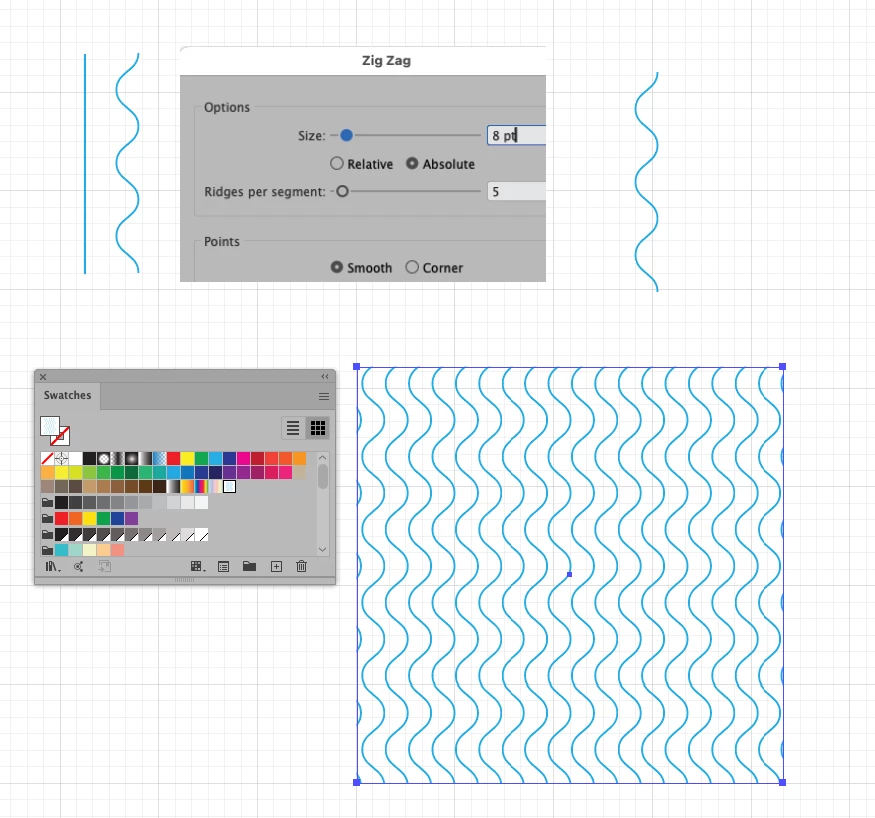
Here I did just a basic wavy vertical pattern.
With the Line Tool, I drew a straight line.
Next, Effect>Distort>Zig Zag.
Shown here are the setting I used.
Be sure to make Ridges per segment an odd number. This way your top and bottom will align when making the pattern.
Object>Expand Appearance
Object>Pattern>Make. This creates a Pattern Swatch.

K

3 replies

Jacob Bugge
Community Expert
Community Expert
May 7, 2025

Diane,


Apart from the solutions already presented, you can also start with a repeatable vertical unit of the wavy line, down to a single instance as suggested by Doug, and then use the effect way:


1) Effect>Distort&Transform>Tranform with a vertical move equalling the height of the unit and a suitable number;

2) Repeat Effect>Distort&Transform>Tranform with a horizontal move equalling the horizontal repeat distance you wish to have for the wavy lines (for 5 wavy lines per 52 cm use 52/5 = 10.4 cm) and a suitable number (5 to cover 52 cm, multiples of 5 for multiples of 52 cm, you seem to need more than one judging by the screenshot with the equal/different spacing).


In this way, you can cover whichever height and width you wish based on just one instance of a repeatable unit of the wavy line with full accuracy; and you can place the set as desired, maybe just centring it on the area to be covered.


If you change your mind about the horizontal repeat distance you wish to have for the wavy lines, you can just select the set and then in the Appearance palette DoubleClick the second Tranform (effect) and change the distance as desired.


You can also expand the (double) effect and get paths when (you think) you are satisfied with the outcome. Remember to save a backup of the effect before you do such a destructive deed.


Jacob Bugge
Community Expert
Community Expert
May 8, 2025

Diane,


To elaborate on the effect start, at any time you can go back to the original single instance and get immediate changes to the whole set; this can be widening and/or stretching or the opposites.


With the right placement of that original single instance you can also ensure the most accurate and versatile layout for the final use, such as a wallpaper, based on a bounding rectangle at the desired full width, here described for the width of 52 cm with 5 wavy lines:


1) You can start the line with a vertical direction, in other words starting and ending with half a Zig and having a full Zag in between; you can make it using the Zig Zag effect with just one segment for a sinusoidal curving, or piece it together from the side parts of a circle for a circular/elliptic curving, such as joins midway between the original Anchor Points creating new Anchor Points with the Object>Path>Add Anchor Points, cutting out and moving the pieces about.


2) You can place the top centre of the first instance at the right position for symmetry, X = 5.2 cm (52 divided by 5 and by 2) and Y = 0 so 5 instances will be centred on the width, then create the (no stroke/no fill) bounding rectangle (to go behind) starting at X = Y = 0, either with a single wavy line width of 10.4 cm or a full width of 52 cm.


You can still expand the effect, keeping the effect for possible later use.


kphotopage
kphotopageCorrect answer
Legend
April 29, 2025

Diane, hi
Here I did just a basic wavy vertical pattern.
With the Line Tool, I drew a straight line.
Next, Effect>Distort>Zig Zag.
Shown here are the setting I used.
Be sure to make Ridges per segment an odd number. This way your top and bottom will align when making the pattern.
Object>Expand Appearance
Object>Pattern>Make. This creates a Pattern Swatch.

K

Participating Frequently
April 29, 2025

Thank you so much! This has worked a treat. 

kphotopage
Legend
April 29, 2025

Glad we could help. Create>Pattern Swatch

As always, so many different ways/methods of doing things with Adobe apps

For seamless patterns, many times I still do old school. 😀

It really depends upon the project. 😁

K

Doug A Roberts
Community Expert
Community Expert
April 29, 2025

Can you show a sketch of what you mean?

Also describe what you've tried so far and exactly where you are getting stuck.

Participating Frequently
April 29, 2025

 sorry I haven't explained myself very well.

ive made this wavy line pattern and it can repeat across the way no problem, but I need it to repeat lengthways so the lines match from the top to the bottom. Does that make sense?


diane

Doug A Roberts
Community Expert
Community Expert
April 29, 2025

1. Create your wavy line repeat element with a short path and Effect > Distort & Transform > Zig Zag.

2. Add a box to define the spacing of the paths in the pattern. Give it no stroke or fill.

3. Drag both to the swatches panel to create a pattern swatch. Create an object and fill it: