
Inspiring
January 22, 2024
Answered

Weird grafic bug in the menu
  • January 22, 2024
  • 1 reply
  • 637 views

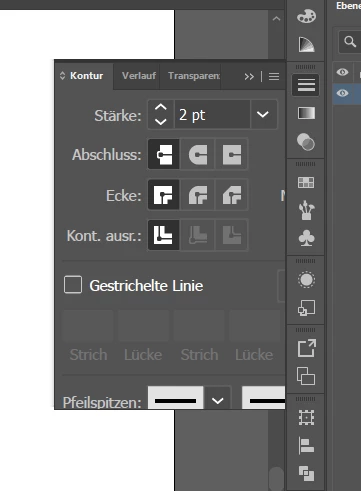
on my wacom cintiq 22 Illustrator's menus are all over the place with the resolution. Some have normal size for the resolution and some menus are so big that it's impossible to get the other tools in the section like in the screenshot above. Is there a fix? My grafic driver is the newest version (Nvidia GeForce RTX 2060) Anyone knows a solution for this issue?

This topic has been closed for replies.
Correct answer Anubhav M

Hello @anyrei,

Sorry to hear about your experience. Would you mind sharing some more details, like the exact version of the OS/Illustrator and screenshots of the Display Settings in the OS/Illustrator, so we can investigate this further?


Looking forward to hearing from you.


Thanks,

Anubhav

1 reply

Anubhav M
Community Manager
Anubhav MCommunity ManagerCorrect answer
Community Manager
January 22, 2024

Hello @anyrei,

Sorry to hear about your experience. Would you mind sharing some more details, like the exact version of the OS/Illustrator and screenshots of the Display Settings in the OS/Illustrator, so we can investigate this further?


Looking forward to hearing from you.


Thanks,

Anubhav

anyreiAuthor
Inspiring
January 22, 2024

Intel(R) Core(TM) i9-9900K CPU @ 3.60GHz 3.60 GHz, 32,0 GB, Windows 10 Pro

NVIDIA GeForce RTX 2060

2 Monitors: Main Monitor 4k (Illustrator display is normal and works) | Wacom Cintiq 22 (1920x1080) (latest driver 6.3.45-1) 


Illustrator Version is 28.1 (I had the same Problem on 28.0)


When I drag my Illustrator to my 4k monitor it works fine. When I drag it to my Cintiq 22 I get the display bugs with font sizes being all over the place. The first 3 screenshots is how my top menu looks like. Screenshot 3 is how it should look the other two is buggy. The last screenshot is a screenshot of my tool settings. I hope it helps. (I wasn't sure what you meant by display settings in Illustrator)


Anshul_Saini
Community Manager
Community Manager
January 22, 2024

Hi @anyrei,


I understand how frustrating it can be when menu sizes vary in Illustrator when moved across multiple screens. Let's try to resolve this issue for you.

Sometimes, issues like this can occur if there is a significant difference in the scaling or resolution between your two screens. Make sure both screens have similar resolution and scaling settings. To adjust scaling settings, right-click on your desktop, select "Display settings," and under "Scale and layout," set both screens to the same scaling percentage and resolution.


Additionally, this is a known issue when working with different resolution monitors. You can upvote this user voice (https://adobe.ly/3ucVd6m) and add your comment to help prioritize it.


Best,

Anshul Saini