
Known Participant
September 13, 2019
Answered

Weird Icon Activated

  • September 13, 2019
  • 1 reply
  • 984 views

So I've accidentally turned on something in Illustrator or opened a window with a shortcut. There's an icon of a cube that's blue/gray/white. How do I get rid of it?


Interestingly, I could have found the answer here in the old forum https://forums.adobe.com/thread/794053, but that link in Google just redirects to the new forums page. : (
    This topic has been closed for replies.
    Correct answer sharp_hands16B8

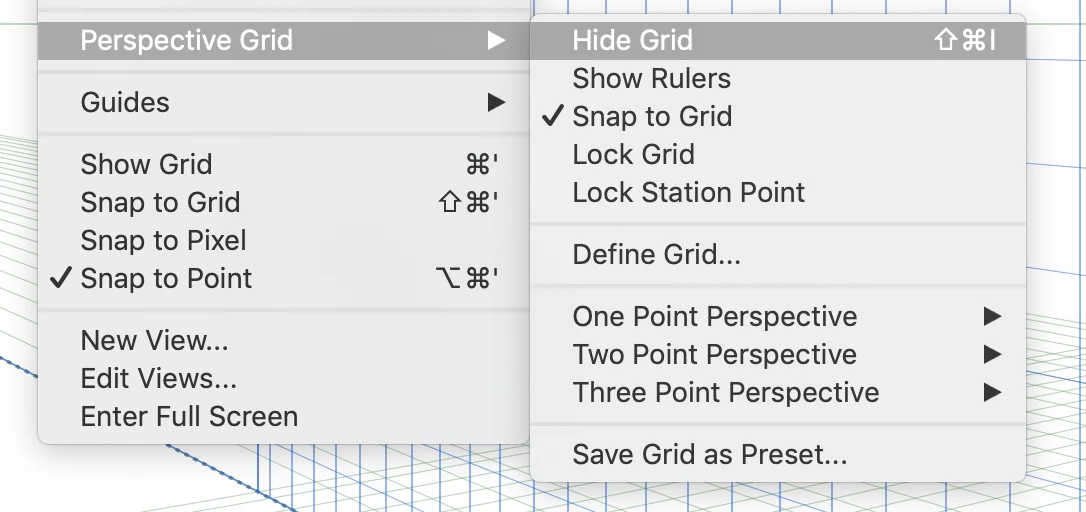
    That's for the 3D perspective view. Under the View menu, scroll down to Perspective Grid, and then turn the grid off. (CMD SHIFT I).


    1 reply

    sharp_hands16B8
    Community Expert
    sharp_hands16B8Community ExpertCorrect answer
    Community Expert
    September 13, 2019

    That's for the 3D perspective view. Under the View menu, scroll down to Perspective Grid, and then turn the grid off. (CMD SHIFT I).


    Known Participant
    September 14, 2019
    Thanks! I must have pressed an incorrect shortcut key.