
Participant
May 9, 2024
Question

Weird Random Letters Appear in Illustrator File

  • May 9, 2024
  • 2 replies
  • 248 views

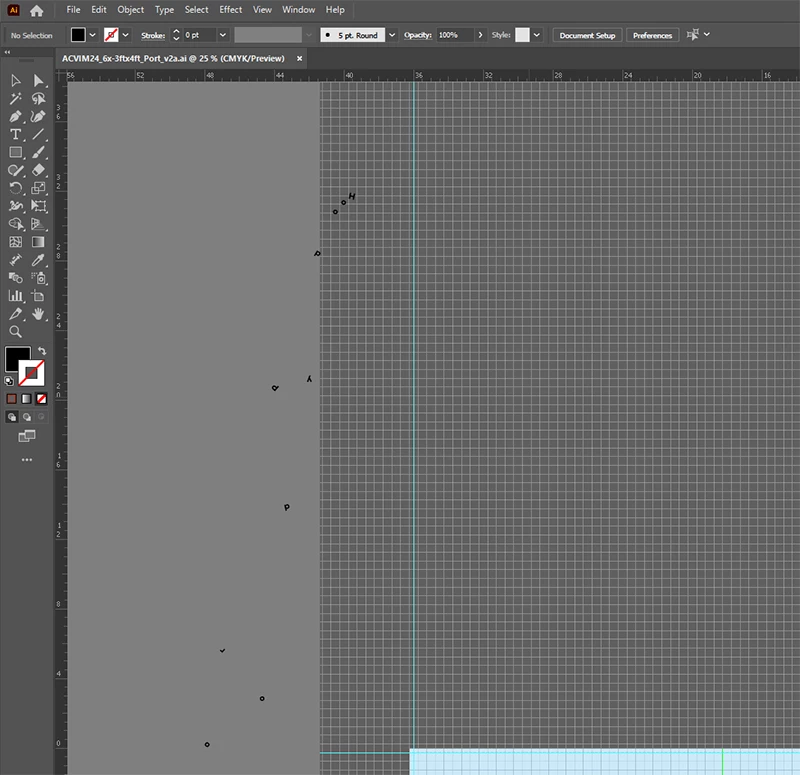
Has anyone experienced this??  I have these weird, random letters of varying sizes and rotations that appeared on my work area of my illustrator file.  I tried rebooting the computer (Windows 10 Pro AMD PC), cleaning it with CCleaner Pro, and restarted Illustrator multiple times, but they're there.  I can't select/highlight them and delete them.  It's like a "screen burn" or something:
 

This topic has been closed for replies.

2 replies

Kurt Gold
Community Expert
Community Expert
May 9, 2024

This has been reported quite often, but as far as I remember it could not be reproduced and explained definitely so far.


Can you see a pattern that causes the letters to appear? Do they appear in all files for you? Or just in some? Can you remember what you did before the zombie letters appeared?


I've never seen them so far, but I guess it is a very special bug.

kglad
Community Expert
Community Expert
May 9, 2024

in the future, to find the best place to post your message, use the list here, https://community.adobe.com/

p.s. i don't think the adobe website, and forums in particular, are easy to navigate, so don't spend a lot of time searching that forum list. do your best and we'll move the post (like this one has already been moved) if it helps you get responses.


<"moved from cc desktop bugs">