Participant
January 11, 2018
Answered

Weird smudging problems with illustrator CC 2017

  • January 11, 2018
  • 2 replies
  • 343 views

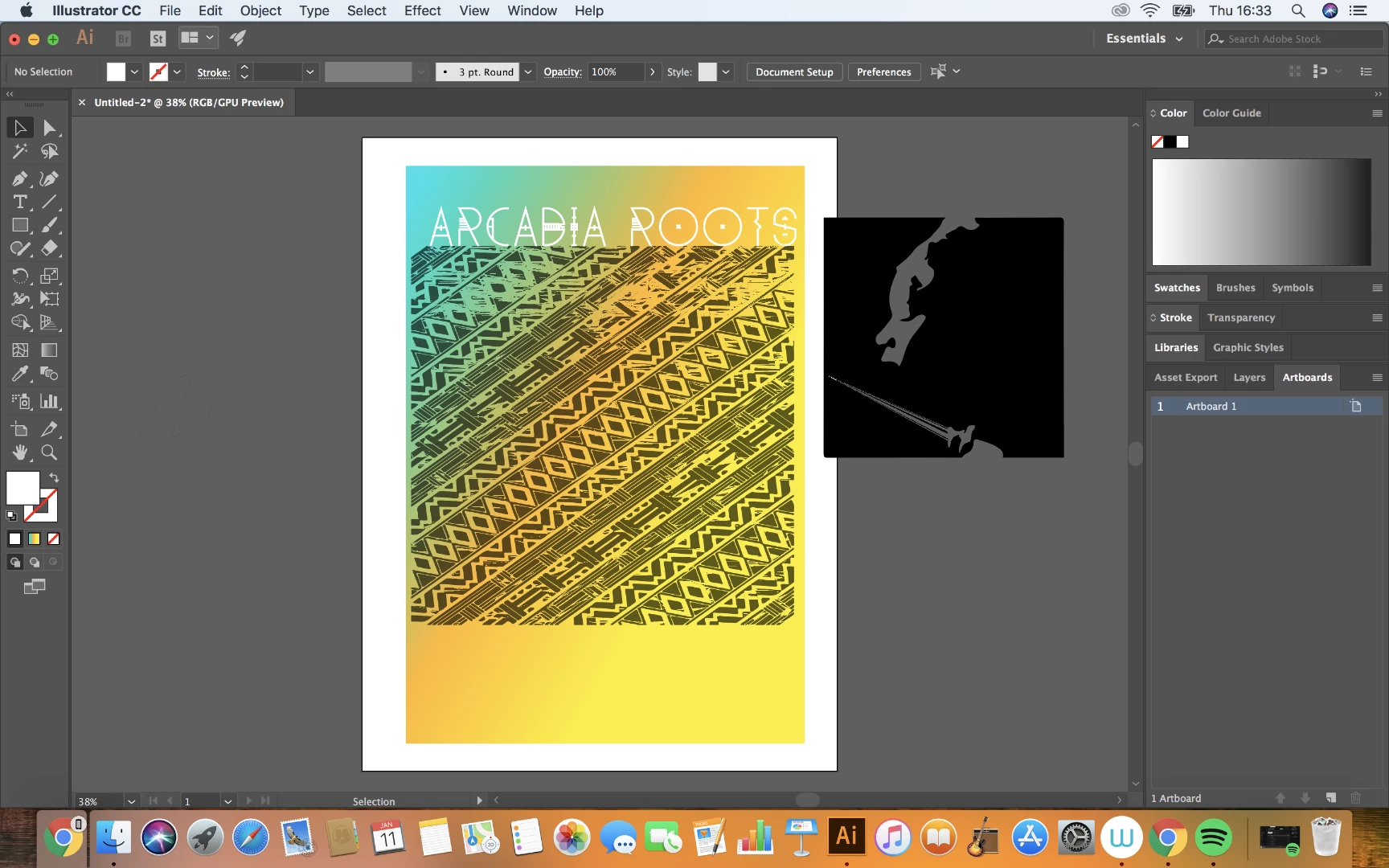
Hi everyone I'm having an issue with illustrator and its really annoying. I start doing a project then when I move things onto an image or or go across an image as I'm moving something it creates this weird smudge which appears to be sharp triangular shapes?

Here's an image of the problem. As you can see at the top of the pattern it's all smudged and when I image traced the lady it leaves a sharp shape.

I hope that makes sense and hopefully someone can help as its really annoying and I can't really do anything.

Thanks.

Josh.
    This topic has been closed for replies.
    Correct answer John Mensinger

    Turn off GPU acceleration.

    View > Preview on CPU

    Preferences > Performance > (un-tick) GPU Performance

    2 replies

    Participant
    January 11, 2018

    Thanks very much! Solved the issue!

    Thanks John, much appreciated.

    Josh

    John Mensinger
    Community Expert
    John MensingerCommunity ExpertCorrect answer
    Community Expert
    January 11, 2018

    Turn off GPU acceleration.

    View > Preview on CPU

    Preferences > Performance > (un-tick) GPU Performance