
Participant
August 17, 2022
Answered

Werkzeugleiste

  • August 17, 2022
  • 3 replies
  • 773 views

Hallo,

wie kann ich die ursprüngliche Werkzeugleiste wieder herstellen? ich habe eine eigene Anordnung der Werkzeuge erstellt und brauche hin u wieder die ursprüngliche Anordnung, da ich als auch Dozent unterwegs bin und die TNs sonst zu Recht verwirrt sind.

Eine Hilfe wäre super, vielen Dank im Voraus,

der dirk
This topic has been closed for replies.
Correct answer michelew83603738

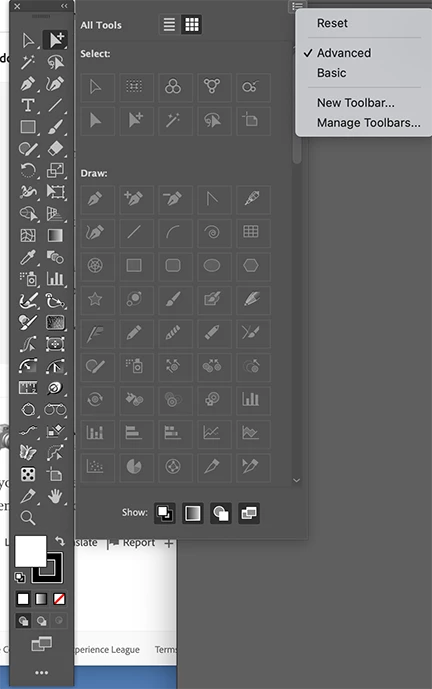
If you go to the bottom of the toolbar, there are 3 dots. When you open that panel, there is a hamburger menu where you can reset tools.


3 replies

Monika Gause
Community Expert
Community Expert
August 17, 2022

Fenster > Werkzeugleisten > Erweitert oder Einfach


In der erweiterten Leiste sind auch immer alle Plugin-Tools enthalten, das kann ggf. bei Seminaren auch nicht förderlich sein. D.h. dann braucht man  doch wieder eine eigene.

michelew83603738
Community Expert
michelew83603738Community ExpertCorrect answer
Community Expert
August 17, 2022

If you go to the bottom of the toolbar, there are 3 dots. When you open that panel, there is a hamburger menu where you can reset tools.


Participant
August 18, 2022

Oh My God! THANX SO MUCH!!

That was easy!!!

In germany, the "RESET"-point is called "ZURÜCK".. usually, when there is a RESET-function, it is called "zurück SETZEN".. So I didn't tried the point..

Now everything semms to be "normal",

so again: thank you BIG TIME!!!

KShinabery212
Community Expert
Community Expert
August 17, 2022

Look at the Window menu (mostly likely Fenster in German)

Then look for workspaces.  Sorry I do not know the German name for it.  But there you can find the various workspaces. 

Cheers from Düsseldorf,

Let's connect on LinkedIn. https://www.linkedin.com/in/kshinabery/
Participant
August 17, 2022

Hej,

that only changes the Workspace (the german Word would be "ARBEITSBEREICH") but not the Toolbar.


The Workspaces are very comfortable to change and to rename and to reset, but I didn't found ANYTHING to reset the Toolbar back to default..??

Anubhav M
Community Manager
Community Manager
August 17, 2022

Hello @Dirk25685083a3kw,


Thanks for reaching out. I would request you check the option for Manage Toolbars and share your observations:


You may learn more about it here: https://helpx.adobe.com/in/illustrator/using/tools.html.


Looking forward to your response.


Thanks,

Anubhav