
Participating Frequently
February 13, 2020
Answered

What do the Illustrator cursor symbols mean?

  • February 13, 2020
  • 12 replies
  • 8506 views

I am having trouble finding a guide to the cursor symbols in Illustrator. By this I mean the hover symbol that the cursor turns into when over different sections of the artboard. I have had a lot of trouble with the Text Tool, and I need to know what the cursor symbols mean but I can't find any guidance on this. Is there a guide or cheat sheet somewhere? Perhaps similar to a keyboard shortcut guide?
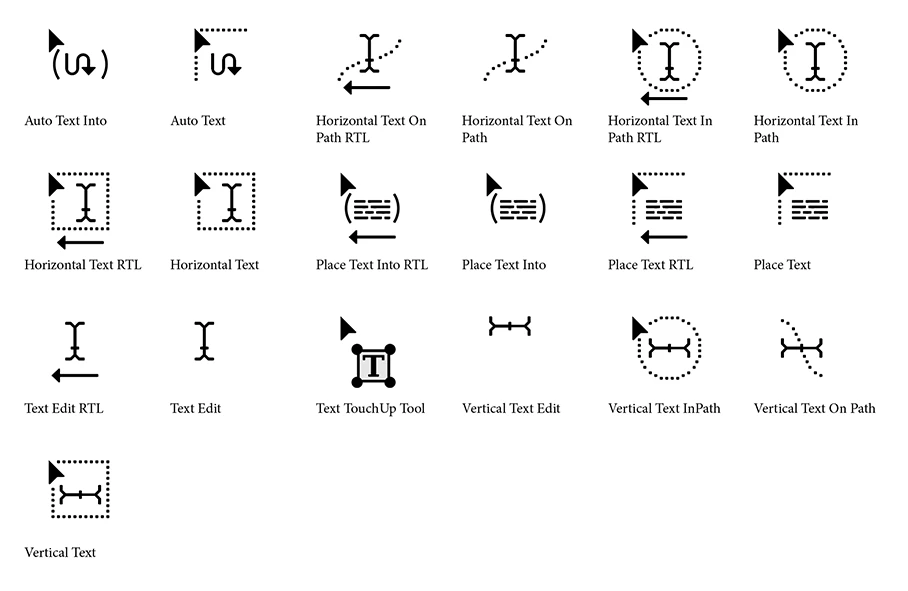
This topic has been closed for replies.
Correct answer Ton Frederiks

12 replies

Kurt Gold
Community Expert
Community Expert
February 13, 2020

You would have to use a screenshot application that is able to capture the screen including the current cursor.


I guess there are such apps available for the Windows OS.

Kurt Gold
Community Expert
Community Expert
February 13, 2020

I'm pretty sure it could be clarified if you were showing the cursor symbols that are causing trouble (whatever you mean by "trouble).

hnichollAuthor
Participating Frequently
February 13, 2020

They include a little black pointer with paragraph text, a little black pointer with a squiggle, a white pointer with a dotted square and others. There's a bunch. (I tried taking screenshots but the Windows keyboard commands switch my cursor to other Illustrator tools instead!). Basically, there are a lot of them I need to figure out so a cheat sheet would be really  helpful.