istanbouly
Participating Frequently
July 23, 2017
Answered

What happen if I include a designed photo in Ps to Ai Then print ?

  • July 23, 2017
  • 5 replies
  • 1213 views

Hello guys I am new to illustrator so I am a beginner , I have designed a photo in Photoshop with dimensions of 20 cm X 7 cm and I want to print it so I went to the printing press to hand them the file so I can print it they told me that I need to hand them an illustrator file not photoshop so they can take care of the bleed now my question is what will happen if I open illustrator and create a new document with the same dimensions 20 X 7 cm but adding bleed this time of 0.5 and then place the image in illustrator. will this work or no please explain. am I going to lose quality this way ?
This topic has been closed for replies.
Correct answer Bill Silbert

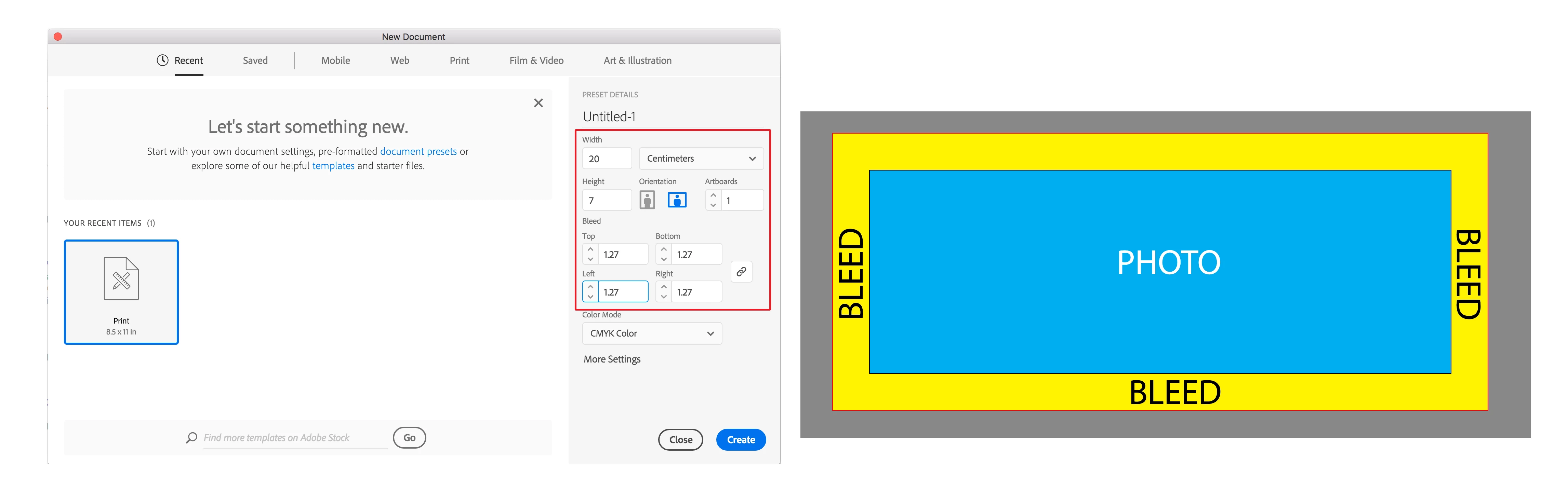
Keep in mind that whatever you add for bleed should be image that you feel is not essential for your design since it will ultimately be cut away. To place the finished image in Illustrator see the screen shot below:

In the New Document dialog box enter the dimensions that the photo is to be trimmed to and the bleed (.5 inch = 1.27 cm) as shown in the area outlined in red in the left picture above. Then use Illustrator's Place... command (found under the File Menu) to locate and place the image into Illustrator as shown in the right picture. Note that the red line that encases the bleed will be in the grey area outside of the white artboard. Illustrator will print an image past the end of the artboard if it has been defined as bleed in this manner.

5 replies

JonathanArias
Legend
July 24, 2017

created a document on indesign to the dimensions and bleed you want. place your photoshop image on the page and scale proportionally, make your high resolution print .pdf with print marks and you are done.  This is the workflow i follow. Adobe illustrator is for making vector art, and making .pdfs out of that vector art and or placing it on other programs for further use ( Adobe indesign, flash, adobe XD

Bill Silbert
Community Expert
Community Expert
July 24, 2017

I just want to point out that even though I gave instructions about placing the image in Illustrator I do agree that InDesign is certainly the more appropriate program for inserting an image to print with crop marks and bleed. I do recognize, however, that there are printers out there who only “know what they know” which means that either their equipment is set for “one thing” such as an .ai or (believe it or not) an .eps. Sometimes a program like Illustrator is the only thing that they have ever learned. As much as we, as professionals, know that something is not the best way to do something there are always factors that will affect the requirements of low end printing and we can only do our best to advise within a given situation.

andreamaestri
Participating Frequently
July 24, 2017

Usually when it comes to printing a raster (e.g Photoshop) image from Illustration there's not a quality loss, but there could be a problem when you need to resize as Illustrator doesn't come with a image interpolation settings. Plus, it's unusual that you will need to provide a .ai file, most of the printing shops should accept a .pdf files and you will need to add a bleed, this guide it might be useful for you : How to add printer’s marks and bleeds in Illustrator

Monika Gause
Community Expert
Community Expert
July 24, 2017

andreamaestri  schrieb

Plus, it's unusual that you will need to provide a .ai file,

And that alone is a sign that should make anybody really nervous about the outcome.

Can anybody please just learn the basics of printing before actually giving anything to print?

Here's a link to a PDF that has just the basics:

Printing Guide for Creative Suite CS6, Acrobat « Caveat Lector

Monika Gause
Community Expert
Community Expert
July 23, 2017

What you can try - depends on your photo if this works:

In Photoshop enlarge the canvas.

Then select all that empty space around your image and fill using the method context aware

It would help greatly if you could show your design. Otherwise it's all a guessing game.

Bill Silbert
Community Expert
Bill SilbertCommunity ExpertCorrect answer
Community Expert
July 23, 2017

Keep in mind that whatever you add for bleed should be image that you feel is not essential for your design since it will ultimately be cut away. To place the finished image in Illustrator see the screen shot below:

In the New Document dialog box enter the dimensions that the photo is to be trimmed to and the bleed (.5 inch = 1.27 cm) as shown in the area outlined in red in the left picture above. Then use Illustrator's Place... command (found under the File Menu) to locate and place the image into Illustrator as shown in the right picture. Note that the red line that encases the bleed will be in the grey area outside of the white artboard. Illustrator will print an image past the end of the artboard if it has been defined as bleed in this manner.

istanbouly
Participating Frequently
July 24, 2017

Yes this is exactly what I did if I hand it to the printing press this way and print it would it be exactly as the photo I designed in photoshop I mean is it going to keep quality this way ?

Monika Gause
Community Expert
Community Expert
July 24, 2017

istanbouly  schrieb

I mean is it going to keep quality this way ?

How should we know without having seen even a screenshot of your artwork?

Nobody can guarantee you anything without knowing what exactly your data is setup like.

We don't have crystal balls.

Monika Gause
Community Expert
Community Expert
July 23, 2017

The Photoshop image will need to be enöarged. Bleed is not added automatically.

SOmetimes just scaling the image will be suffient. Sometimes the complete design needs to be re-created.