Markmartini
Participant
October 7, 2020
Answered

What is Illustrator shortcut for Select > Same > Fill color?

  • October 7, 2020
  • 4 replies
  • 10615 views

what is illustrator short cot for select > same > fill color ? i'm desperate cant find .. 🙂


please help

This topic has been closed for replies.
Correct answer jane-e


Hi @Markmartini 

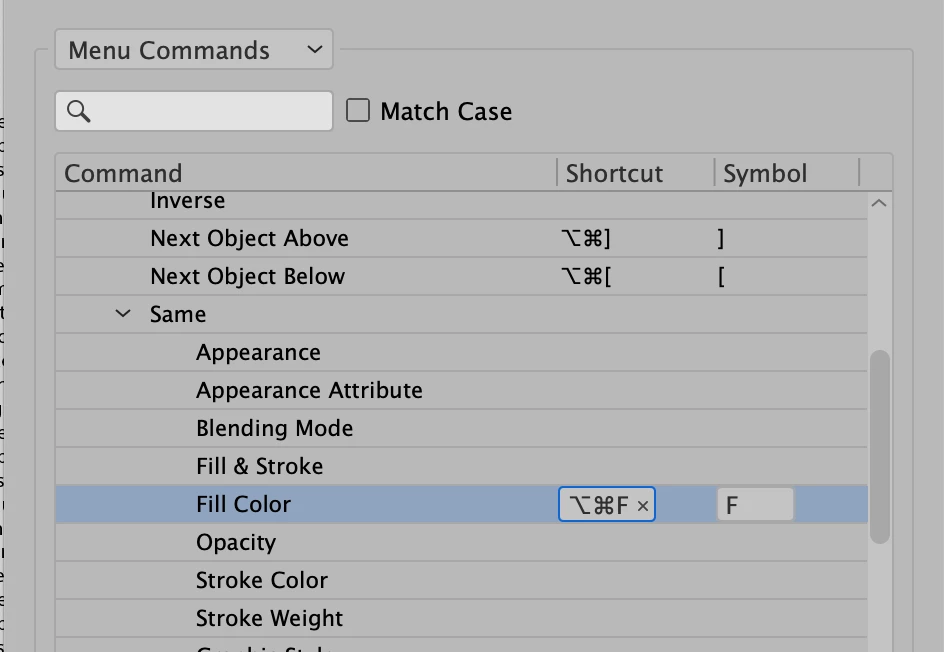
There is not one. You can assign a shortcut by going to

Edit > Keyboard Shortcuts > Menu Commands > Select menu > Same > Fill Color.

Here I used Cmd+Opt+F
I'll move this to the Illustrator forum from the Photoshop forum.

~ Jane


4 replies

Mario Arizmendi
Legend
October 16, 2020

Illustrator has a very old  command to do something similar, but it works to redo whatever the last operation you did on the Select Menu, it is called Reselect and his shortcut is Command6, I use this all the time


Markmartini
Participant
October 16, 2020

thanks

Ashutosh_Mishra
Inspiring
October 10, 2020

Hi there,


Thanks for reaching out. Jane is absolutely correct. In addition to her response, please find more information on keyboard shortcuts & how you can customize them on this help article.

Hope it helps.


Regards,

Ashutosh

jane-e
Community Expert
jane-eCommunity ExpertCorrect answer
Community Expert
October 7, 2020


Hi @Markmartini 

There is not one. You can assign a shortcut by going to

Edit > Keyboard Shortcuts > Menu Commands > Select menu > Same > Fill Color.

Here I used Cmd+Opt+F

I'll move this to the Illustrator forum from the Photoshop forum.

~ Jane