
sonofmrsnak
Inspiring
November 10, 2017
Answered

What is keyboard command to drag/scale text in a bounding box?

  • November 10, 2017
  • 1 reply
  • 36015 views

Sorry, should be simple, but no commands I'm doing,  shift-command, etc. are scaling the text in a visible bounding box, only the box itself.

Not seeing any answers Googling this topic.

CC2018

TIA
    This topic has been closed for replies.
    Correct answer Mike_Gondek10189183

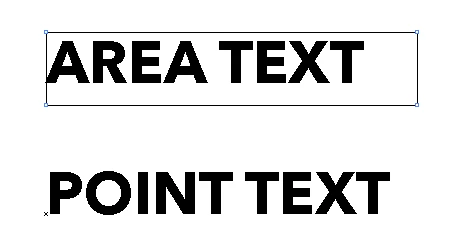
    Sounds like you are in the selection tool trying to scale area text. That instead scales the container the text is in.

    Hit E to switch to the transform tool instead and try.

    If you had point text (text that is not in a container), the selection tool could scale the type. You can more easily confirm the difference in outline mode.

    You can also do type >> convert to point type and then try.

    1 reply

    Mike_Gondek10189183
    Community Expert
    Mike_Gondek10189183Community ExpertCorrect answer
    Community Expert
    November 10, 2017

    Sounds like you are in the selection tool trying to scale area text. That instead scales the container the text is in.

    Hit E to switch to the transform tool instead and try.

    If you had point text (text that is not in a container), the selection tool could scale the type. You can more easily confirm the difference in outline mode.

    You can also do type >> convert to point type and then try.

    sonofmrsnak
    Inspiring
    November 10, 2017

    Thanks, I knew it was simple, just could not find anything on this.

    E goes to the eraser tool. e goes to transform. :-)

    Transform tool does exactly what I was looking for.

    Mike_Gondek10189183
    Community Expert
    Community Expert
    November 10, 2017

    For my part you are welcome. Thanks for mentioning about lowercase e, that is what I should have typed.