
Participating Frequently
December 22, 2020
Answered

What is the best way to create some kind of Sudoku?

  • December 22, 2020
  • 3 replies
  • 1486 views

Hello everyone,
I would like to create some kind of Sudoku in Illustrator, using two different fonts. The first one (A) should predominate and be very transparent. The other one (B) is only for single words and should not be transparent.
It is important here that I can change especially font B and its content again and again with little effort. As an example for my idea the following picture:
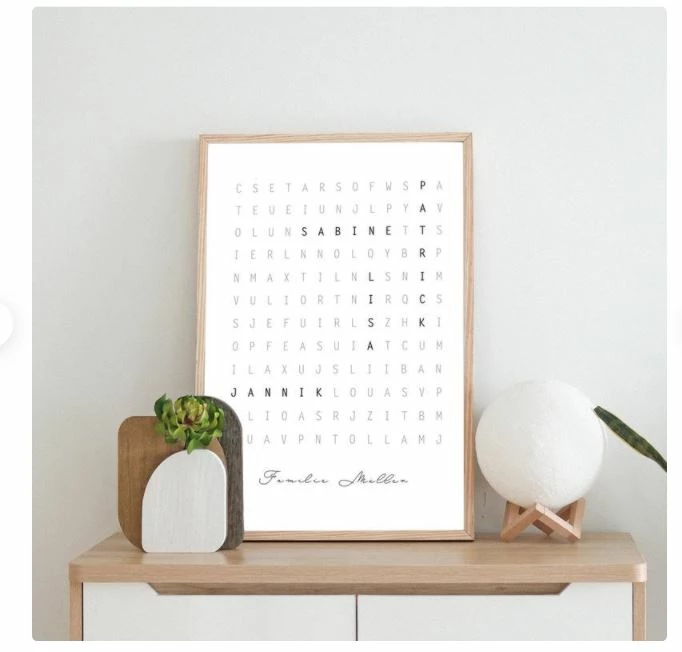
(source: ETSY)


So far I have converted the individual text areas to paths, however I can't change the font and text afterwards.... In addition, I have read that it comes to problems when you change the image size?


I hope someone can help me with this idea and tell me if it works with Illsutrator and if so, how?


Greetings,

Adelmore
This topic has been closed for replies.
Correct answer Ton Frederiks

I think using the word Sudoku was confusing.

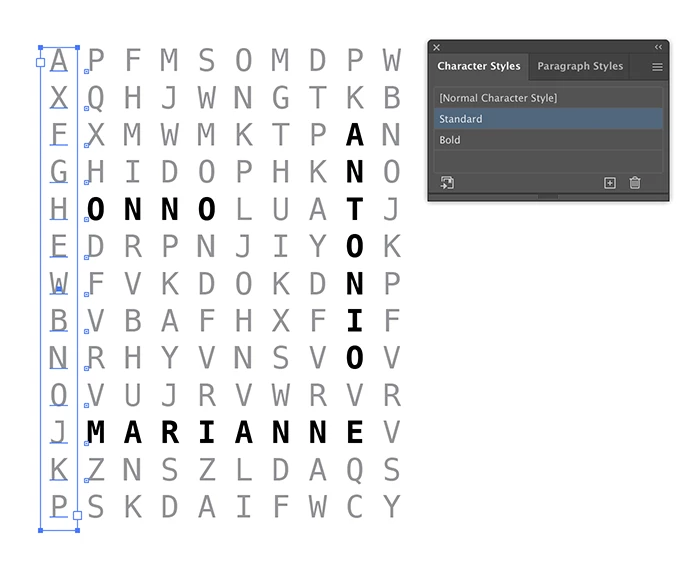
If the main characters are random, I would setup a grid from horizontal or (as shown here) vertical textframes and fill it with the light random characters. Use a monospaced font to make it easier.

Create character styles for the bold and light text.

Keep the text live.

Save it as an .ait (Illustrator Template) file on your desktop and use that file every time.

3 replies

kphotopage
Legend
December 23, 2020

Adelmore, Hi.


For years I worked on educational books. The focus was on reading, writing and vocabulary.

Creating crossword puzzles and word search puzzles was very common for me to create for the student exercises.


Hands down, InDesign Tables is the best method

Illustrator does not have Tables


K

Ton Frederiks
Community Expert
Community Expert
December 22, 2020

Are the letters in the light font words or are they random letters?

AdelmoreAuthor
Participating Frequently
December 23, 2020

The light font words are random letters.

So far I made two layers, one with the light font and the other with a thicker font, tried to arrange these two in a straight line, change the layers into paths and then mark the light fonts and change the transparency..

Unfortunately this method is unfit for the purpose to create several of these with different names and optimally different characters

Ton Frederiks
Community Expert
Ton FrederiksCommunity ExpertCorrect answer
Community Expert
December 23, 2020

I think using the word Sudoku was confusing.

If the main characters are random, I would setup a grid from horizontal or (as shown here) vertical textframes and fill it with the light random characters. Use a monospaced font to make it easier.

Create character styles for the bold and light text.

Keep the text live.

Save it as an .ait (Illustrator Template) file on your desktop and use that file every time.

Monika Gause
Community Expert
Community Expert
December 22, 2020

That is a crossword puzzle or rather a word search. There are online generators for that.


But I assume there is a reason you want to generate it in Illustrator?

AdelmoreAuthor
Participating Frequently
December 22, 2020

Thanks for the fast reply! Did not know that these generators actually exist but I would like to do it in Illsutrator because then I have a vector file and can print it myself without a resolution loss.

Monika Gause
Community Expert
Community Expert
December 22, 2020

They won't be easy to edit in Illustrator.

They won't be automatically generated.


Iwould look for aservice that can generate PDF files or SVGs.You could then try and import the files in to Illustrator if you want to refine them.


If you want to do this in Illustrator, you would need to write a script for it. Could get complicated.