
Inspiring
November 16, 2020
Answered

what is the difference between the outline stroke command and effect?

  • November 16, 2020
  • 2 replies
  • 1904 views

SEEMs like the outline path effect doesn't do anything, but I'm sure I just need to be educated. What is the difference between them and why would I use one over the other? Thanks.


This topic has been closed for replies.
Correct answer Doug A Roberts

In any situation where you want an object to display as if it has an outlined stroke without actually modifying the path.

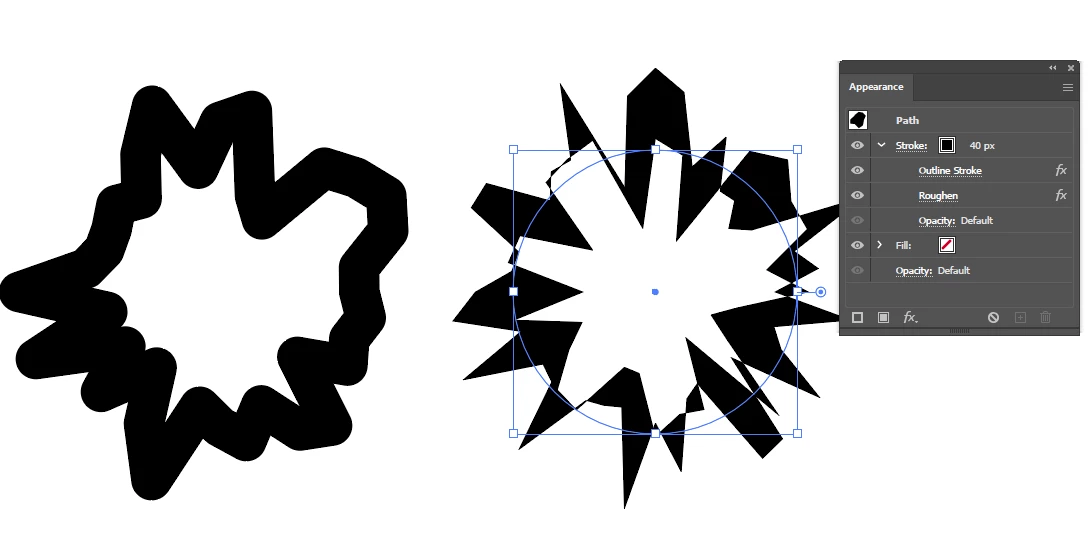
A simple example: both shapes have 'Roughen' applied, but the right one also has 'Outline Stroke'. It acts as if the ellipse is a compound path rather than a single stroked path, roughening the outer and inner rings separately.

2 replies

Ashutosh_Mishra
Inspiring
November 28, 2020

Hi there,


Thanks for reaching out. In addition to what Doug has explained, please check out this help article(https://helpx.adobe.com/in/illustrator/using/painting-fills-strokes.html) to know more about fills & strokes. Hope it helps.


Regards,

Ashutosh

Doug A Roberts
Community Expert
Community Expert
November 16, 2020

It doesn't (visibly) do anything on its own, but it modifies subsequent effects so that they act as if the stroke has been outlined -- as long as it's above them in the appearance panel.

dDembickiAuthor
Inspiring
November 24, 2020

Okay. So when would I want to use one over the other? 

Doug A Roberts
Community Expert
Doug A RobertsCommunity ExpertCorrect answer
Community Expert
November 24, 2020

In any situation where you want an object to display as if it has an outlined stroke without actually modifying the path.

A simple example: both shapes have 'Roughen' applied, but the right one also has 'Outline Stroke'. It acts as if the ellipse is a compound path rather than a single stroked path, roughening the outer and inner rings separately.