
Participant
August 11, 2022
Answered

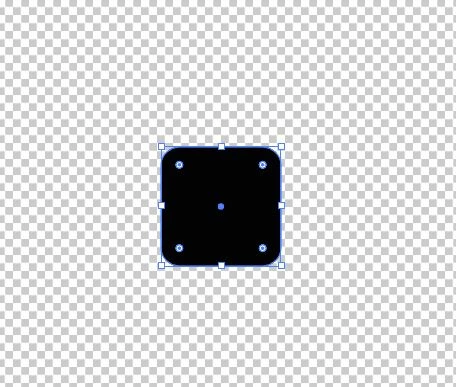
what is this four things in corner?

  • August 11, 2022
  • 1 reply
  • 278 views

after illustrator crashed i reinstalled the program and then i get these points in each corner of a cube, the problem is that when i change the size it becomes round like a circle. how do i remove this things in corner? it wasn't like that before the reinstall.


This topic has been closed for replies.
Correct answer Doug A Roberts

Those are rounded corner widgets. They are a normal part of the software.

If you want the corners to scale with the object, open the Transform panel and check 'Scale corners'.

If you don't want to see them at all, go to View > Hide corner widget.

1 reply

Doug A Roberts
Community Expert
Doug A RobertsCommunity ExpertCorrect answer
Community Expert
August 11, 2022

Those are rounded corner widgets. They are a normal part of the software.

If you want the corners to scale with the object, open the Transform panel and check 'Scale corners'.

If you don't want to see them at all, go to View > Hide corner widget.

Participant
August 21, 2022

This things in corner was not the problem. the black "box" corners be like this when i change size.