


Participating Frequently
Oct 29, 2026 7:59 PM UTC
Question

When exporting as a PDF, my images are disappearing

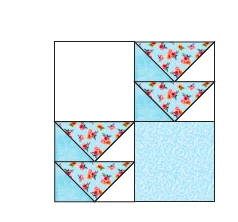
I am trying to export an Ai file as a PDF, something I have done many times before. Currently though, when I open the PDF the images are either completely missing leaving just the outline, or partially missing. When I print, however, the images are all there, though some of them have “moved.” I even tried it on an Ai file I had exported as a PDF a year ago. It is also effected. I appreciate any help. 
Screenshot: This is from the PDF, the white should be the blue.
 

    5 replies

    Participating Frequently
    Oct 30, 2026 6:38 PM UTC

    Something else that happens, when I zoom in on the PDF, the images will fill in, but as soon as I scroll, they disappear again. I’ve turned off the program and restarted it, and did the same with my Mac. I’ve also started a brand new file. It is the same thing each time. It all looks great in Illustrator, when exported (or saved as, either one) as a PDF, the images are not complete. 

    Translate
    Monika Gause
    Community Expert
    Community Expert
    Oct 30, 2026 9:59 AM UTC

    Which application are you using to view the PDF? Acrobat?

    Translate
    Participating Frequently
    Oct 30, 2026 5:55 PM UTC

    Yes, I am using Acrobat.

    Translate
    Ton Frederiks
    Community Expert
    Community Expert
    Oct 29, 2026 8:47 PM UTC

    ​@Jen36404907uiwz Can you share an example file? Are you using the latest version of Illustrator?

    Translate
    Participating Frequently
    Oct 30, 2026 5:56 PM UTC

    How do I share an example file? Technology is obviously not my strong suit. And I apologize for the slow response. I’m a family child care provider in my real life, so this side job is nap time work only. 
    Yes, I’m using the latest version.

    Translate