
Inspiring
May 9, 2022
Answered

When exporting to SVG in Illustrator, rename layers alphabetically

  • May 9, 2022
  • 5 replies
  • 1735 views

Hello, I have a problem when exporting to SVG in Illustrator 26.2.1, genuine and updated to the latest version.

When doing the export it changes the names of the layers to [a, b, c, ...] and creates some empty spaces without information. I need to keep the layer name to be able to work with the SVG file in my web app.


There is an example of the exported file.
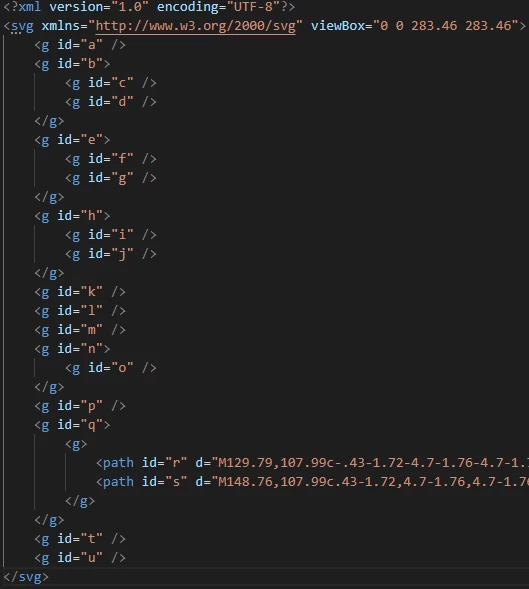


Not all Illustrator installations work like this, some just export the file fine with the correct layer names.

I would like to know what is the source of this problem. As I mentioned, they are updated to the latest version.


Could you help me? Thank you!


This topic has been closed for replies.
Correct answer daniell79942275

Hello, I was able to solve it by deleting the folder %appdata%\Adobe\Adobe Illustrator 26 Settings\

It seems that this configuration gets corrupted after a while and badly exports the files.

I know it's not the best solution, but at least we can keep working.

Thank you.

5 replies

daniell79942275AuthorCorrect answer
Inspiring
May 12, 2022

Hello, I was able to solve it by deleting the folder %appdata%\Adobe\Adobe Illustrator 26 Settings\

It seems that this configuration gets corrupted after a while and badly exports the files.

I know it's not the best solution, but at least we can keep working.

Thank you.

Anshul_Saini
Community Manager
Community Manager
May 24, 2022

Hi @daniell79942275,


We are glad to hear that you have figured out a workaround. It seems this issue surfaced in v26.1, and for some users downgrading to Illustrator v26.0.3 or earlier helped resolve the issue. We have already logged a bug with the team, and they are currently working on a fix. We appreciate your patience and request you to stay tuned for the updates.


Thanks & Regards,

Anshul Saini

Mike_Gondek10189183
Community Expert
Community Expert
May 10, 2022

Which option are you using to make .svg. I have an issue with a blend that gets dropped if I use the other eoptons.


Try File  >> Export >> Export As and test out these options. For reference read here.

Try all options until you find which may work. You can also try file >> save as >> SVG but that is the one that drops my blend.even though I have embed.


Inspiring
May 10, 2022

Hi Mike,

I have tried all those options, but unfortunately I get the same result 😞

Also we need to keep 'Inline style' option in Styling, in order to work with those layers and edit properties like fill-tone to change layer color, etc.

Community Expert
May 10, 2022

Those layers are all empty apart from two paths. If you select just those two paths and paste them in a new document and name them in the Layers panel, would it export to SVG correctly?

Inspiring
May 10, 2022

Hi Kenneth,

This is the same file exported on other Illustrator installation (version 26.1).

It doesn't insert empty layers and keeps the correct names.


Community Expert
May 10, 2022

Sounds like a bug in that case? Are you using M1?

Eric Dumas
Community Expert
Community Expert
May 10, 2022

Hi,

Can you share the exact settings you are using to export your design?

Inspiring
May 10, 2022

Hi Eric, we export it from option File > Export > Export as .. > SVG


SVG Options

Styling: Inline Style

Font: SVG

Images: Embed

Object IDs: Layer Names

Decimal: 2

Minify ☑️

Responsive ☑️

Inspiring
May 10, 2022

Hello once again.

We have tried to restore the configuration preferences, following the instructions of this link:
How to set preferences in Illustrator 


But it keeps exporting the file with those alphabetic layers.

Could you please give us support for this problem?

Thanks!