


Ebandit
Participant
May 12, 2026
Answered

When I import a .psd image in greyscale plus spot colours, only the black appears.

  • May 12, 2026
  • 4 replies
  • 102 views

When I import a .psd image in greyscale plus spot colours, only the black appears. The Pantone colours don’t even show up in the list. Is this happening to you too?  
This isn’t the case for
- CMYK+Spot
- Greyscale with a layer
- Greyscale with an alpha channel
- .TIF
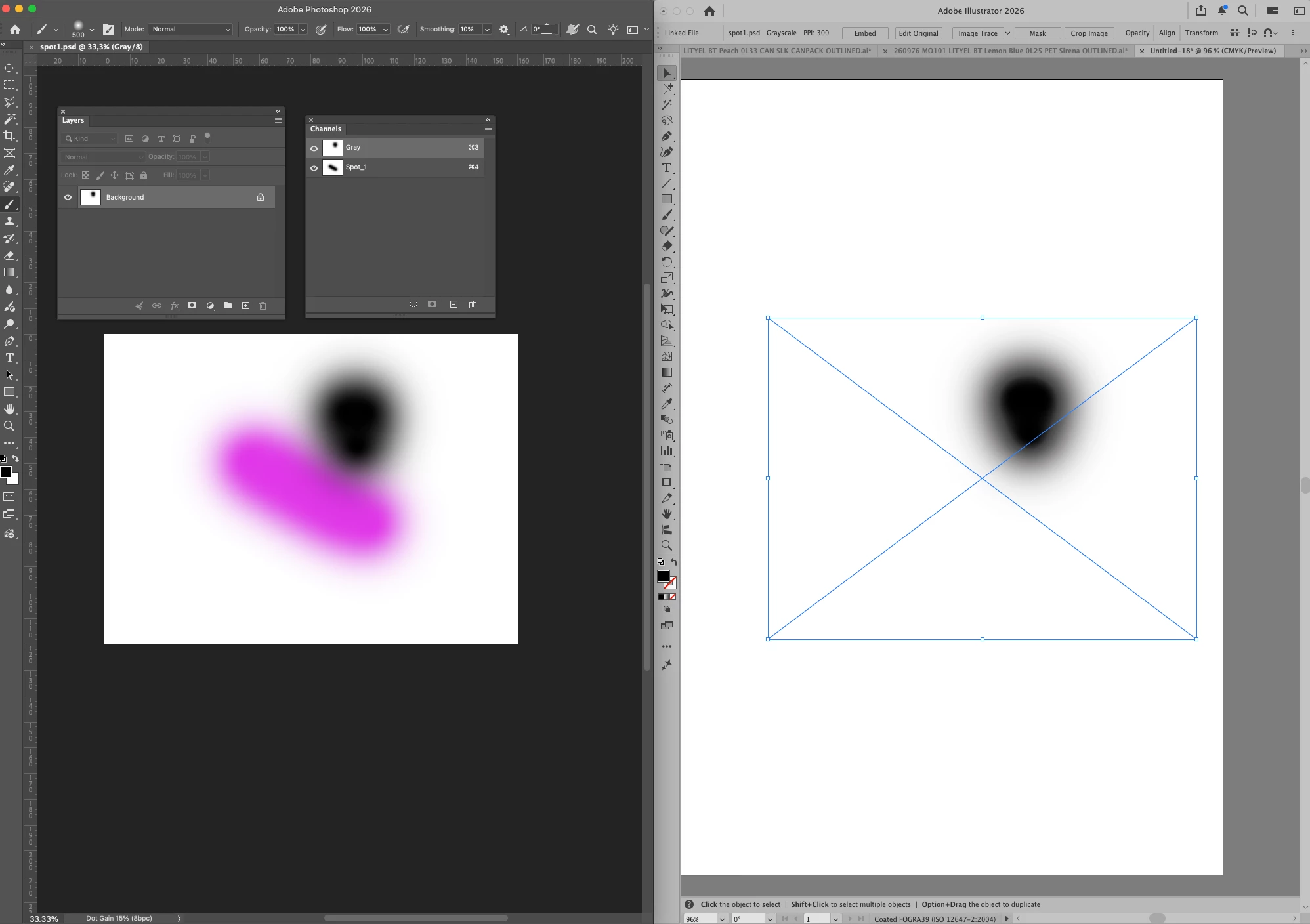
 

Thanks in advance !

    Correct answer Ton Frederiks

    @Ebandit Yes, it is a known problem. Either use .tif or go back to a previous Illustrator version.

    See: 

    And you can vote here: https://illustrator.uservoice.com/forums/601447-illustrator-desktop-bugs/suggestions/51218380-illustrator-in-30-3-version-stopped-reading-spot-c

    4 replies

    Anubhav M
    Community Manager
    Community Manager
    May 13, 2026

    Hello everyone,

    Our team is currently investigating the issue. I will update this thread as we have more information.
    Please don't hesitate to reach out if you have more questions or need assistance. We'd be happy to help.


    Anubhav

    Ebandit
    EbanditAuthor
    Participant
    May 13, 2026

    Thanks, everyone, for your replies.

    The problem is more that we have a lot of files created in this way (packaging designs) and the risk that these files might be opened and reprinted with the error.

    I really hope this bug will be fixed as soon as possible.

    Dave Creamer of IDEAS
    Community Expert
    Community Expert
    May 13, 2026

    Consider downgrading to 2025 until the bug is fixed. 

    David Creamer: Community Expert (ACI and ACE 1995-2023)
    Ton Frederiks
    Community Expert
    Ton FrederiksCommunity ExpertCorrect answer
    Community Expert
    May 12, 2026

    @Ebandit Yes, it is a known problem. Either use .tif or go back to a previous Illustrator version.

    See: 

    And you can vote here: https://illustrator.uservoice.com/forums/601447-illustrator-desktop-bugs/suggestions/51218380-illustrator-in-30-3-version-stopped-reading-spot-c

    Brad @ Roaring Mouse
    Community Expert
    Community Expert
    May 12, 2026

    Yup.

    Not only that, but an old file done in a previous version where they import corrcetly will open in 2026 with the spots missing. Although they are still in the Swatches.

    Conversely, a file saved from 2026 where the spots didn’t show nor were added to the Swatches, will open correctly in an older version.

    Dave Creamer of IDEAS
    Community Expert
    Community Expert
    May 12, 2026

    Save the image as EPS (or use InDesign).

    David Creamer: Community Expert (ACI and ACE 1995-2023)