Inspiring
February 25, 2019
Answered

When I save a clipped File as a JPEG the clipped area is still allocated space?

  • February 25, 2019
  • 2 replies
  • 878 views

Hi

I'm doing a Facebook banner image and I'm clipping the background image to the size of the art board (using a rectangle the same size as the art board), but when I export the image as a JPEG, it keeps the original image boundary as part of the image (in the image below the area of white is the original image area that has been clipped, the dark inner rectangle is the art board).

How do I save just the clipped area as it's own JPEG?

This topic has been closed for replies.
Correct answer John Mensinger

https://forums.adobe.com/people/paul+knight  wrote

That won't make a difference

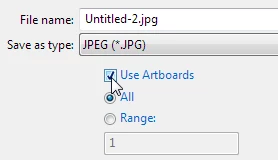
If you tick Use Artboards near the bottom of the Export dialog, it will clip your image to the artboard no matter what.

Did you try it?

2 replies

sharp_hands16B8
Community Expert
Community Expert
February 25, 2019

If you use the Export As option, it brings up the Export Panel. From there you can work under the Artboard tab to set your settings (output directory, format, size, etc...)

When I use this feature it always crops to the artboard parameters.

Daniel E Lane
Inspiring
February 25, 2019

How did you clip the background area to the inset size? You need to just trim the actual artboard down to that size, then when you are exporting the jpeg, tell it to clip to artboard

Inspiring
February 25, 2019

Hi,

That won't make a difference because the image will still stay the same size regardless of what I do to the art board. The actual rectangle I used to clip the the picture to the art board is the same size as the art board (i.e. it art board is currently smaller than the image anyway).

Paul.

John Mensinger
Community Expert
John MensingerCommunity ExpertCorrect answer
Community Expert
February 25, 2019

https://forums.adobe.com/people/paul+knight  wrote

That won't make a difference

If you tick Use Artboards near the bottom of the Export dialog, it will clip your image to the artboard no matter what.

Did you try it?