
pawleyt
Participant
July 3, 2020
Answered

When moving vector object, I can't see the previous placement path

  • July 3, 2020
  • 1 reply
  • 3176 views

For some reason, when I move anything within illustrator I can't see the previous path (where I moved it from / ghost path?)


I've updated Illustrator, reset my computer....turned if off and on again....but no luck


Am I missing a simple tick box? as it's very hard to work without it.
This topic has been closed for replies.
Correct answer Ares Hovhannesyan

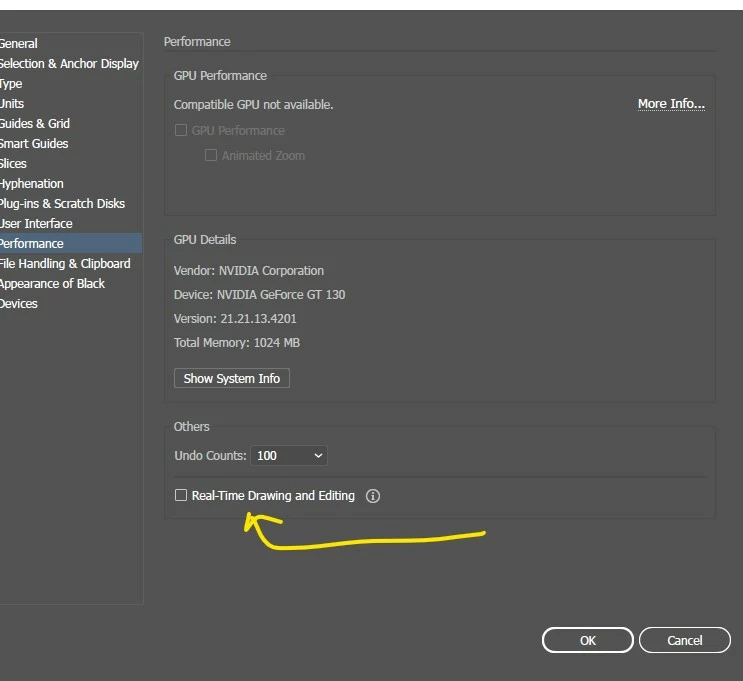
Thee is an update. You can check.uncheck live preview: https://helpx.adobe.com/illustrator/using/whats-new/2020-1.html#real-time-drawing

Real-time drawing and editing

With this feature, the object scaling and the effect application on objects are no longer displayed as outlines. Now, these tasks are fully rendered as you work.

Set the following preference to enable this feature:

  • [Windows] Choose Edit > Preferences > Performance > Real-Time Drawing and Editing.
  • [macOS] Choose Illustrator > Preferences > Performance > Real-Time Drawing and Editing.


1 reply

Ares Hovhannesyan
Community Expert
Ares HovhannesyanCommunity ExpertCorrect answer
Community Expert
July 3, 2020

Thee is an update. You can check.uncheck live preview: https://helpx.adobe.com/illustrator/using/whats-new/2020-1.html#real-time-drawing

Real-time drawing and editing

With this feature, the object scaling and the effect application on objects are no longer displayed as outlines. Now, these tasks are fully rendered as you work.

Set the following preference to enable this feature:

  • [Windows] Choose Edit > Preferences > Performance > Real-Time Drawing and Editing.
  • [macOS] Choose Illustrator > Preferences > Performance > Real-Time Drawing and Editing.


pawleyt
pawleytAuthor
Participant
July 3, 2020

Excellent! Thank you very much!