
Participant
July 1, 2024
Answered

when transparency is set to "screen" the any color changes to white in illustrator. why is that?

  • July 1, 2024
  • 2 replies
  • 378 views
 

1) Gradient was applied & in appreance section,
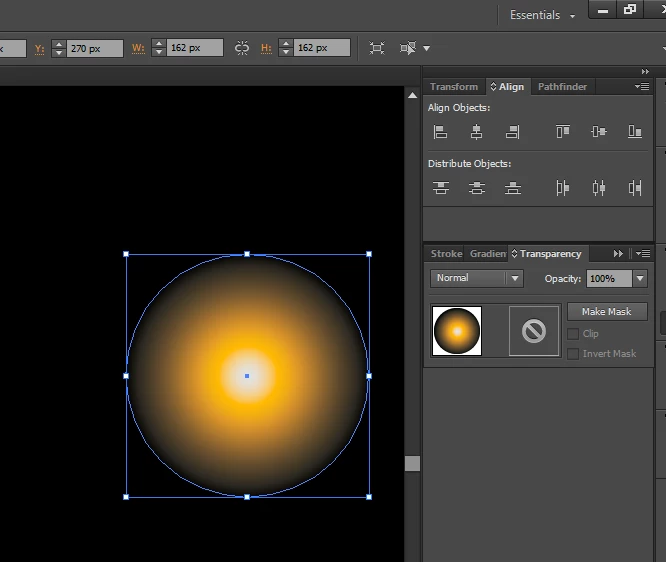
2) in apperance if "screen" is selected the the gradient chnages to white. Why is this happening? how do i resolve this?
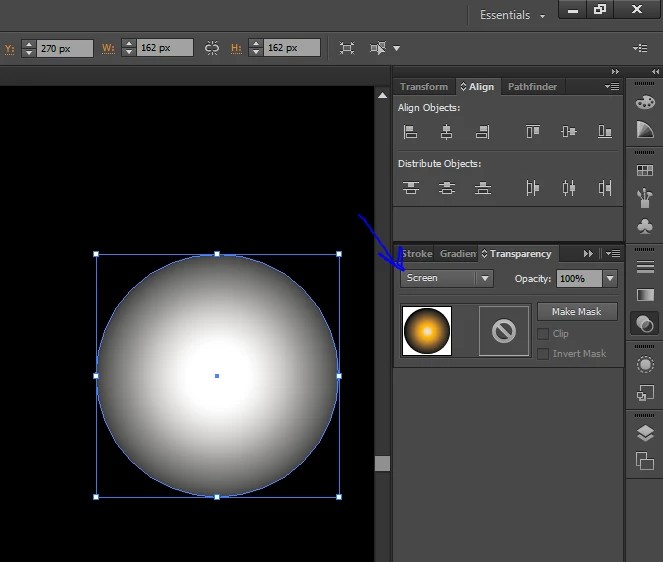


This topic has been closed for replies.
Correct answer Ton Frederiks

You are probably working in a CMYK document, some blend modes behave different in CMYK. Try this in an RGB document.

2 replies

Ton Frederiks
Community Expert
Ton FrederiksCommunity ExpertCorrect answer
Community Expert
July 1, 2024

You are probably working in a CMYK document, some blend modes behave different in CMYK. Try this in an RGB document.

Participant
July 2, 2024

@Ton Frederiks That you so much for the guidance. Problem is solved as i changed the document color mode to RGB. Have a great day 🙂

Ton Frederiks
Community Expert
Community Expert
July 2, 2024

Good ton hear that helped, if you ever want to convert it to CMYK, rasterize it first in RGB mode.

Anubhav M
Community Manager
Community Manager
July 1, 2024

Hello @veebhan38226741mwwr,

Thanks for reaching out. Would you mind sharing some more details, like the exact version of the OS/Illustrator, system config (CPU/GPU/Memory), a public link to a sample file after uploading it to Dropbox/Google Drive/etc., and a screen recording of your workflow and the problem (https://adobe.ly/45VhuUP), so we can investigate this further?

Looking forward to hearing from you.


Thanks,

Anubhav

Participant
July 2, 2024

@Anubhav M Thank you for your reply . Problem is solved witth the help of comments from @Ton Frederiks .  Have a great day :).