Inspiring
September 16, 2021
Question

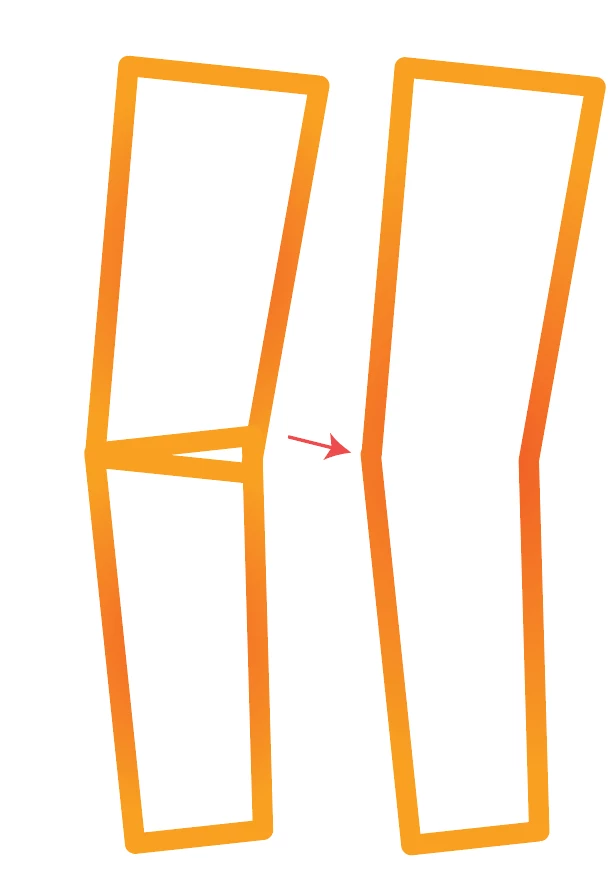
When uniting shapes, strokes off set creating a bump in the newly created object

  • September 16, 2021
  • 2 replies
  • 385 views

Can't get them to line up uniformly. When I hit unite in pathfinder, it also creates a bump. I'm sure this is a very common problem, and I'm hoping it's one of those that requires a simple solution like modify a preference. Learning this for my students to help them. Thank you. 
This topic has been closed for replies.

2 replies

Doug A Roberts
Community Expert
Community Expert
September 16, 2021

When you say you "can't get them to line up uniformly", what is preventing you achieving that?

Is this a stroke or something outlined?

Are you using smart guides?


Inspiring
September 21, 2021

Just shapes with a stroke applied. Smart guides is checked. The strokes is applied the same to both shapes. When you try to line the strokes up though, they just won't. Smart guides is helpful, so I would imagine you could still do this even with smart guides on. 

sishamIAGD
Community Expert
Community Expert
September 16, 2021

Looks like your original doesn't line up, so if that isn't correct before you unite them then it will be incorrect in the united version. What does the 2 shapes look like when you preview in outline view? do the 2 corners match up exactly to start with?

Inspiring
September 21, 2021

In outline mode, you can't get them to line up. It always forces my line over to the right or to the left. 

Ton Frederiks
Community Expert
Community Expert
September 21, 2021

If you can't get them to line up, maybe some Snap To option is preventing that (Grid, Pixel).