Participant
December 4, 2018
Answered

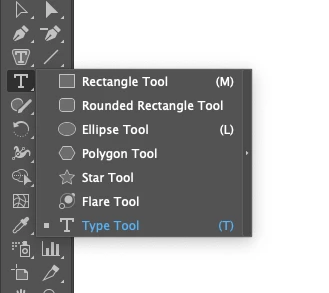
When/why did the 'Type' tool (T) move into the same palette as 'shapes'?

  • December 4, 2018
  • 3 replies
  • 1797 views

I spend several minutes trying to work out why the Type tool was no longer in the top level of the 'Type' drop down palette - I couldn't find it anywhere. On pressing 'T' I discovered it's in the same drop down as shapes, at the bottom. (See attached)

Why on earth is this? and when did it change?

Am I going mad?

This makes no sense - as if using the text tool is secondary to using the Star or Flare tools?

And that 'Area Type' is a more common and important tool than a standard Text box!??!

Arghh!

Thanks
This topic has been closed for replies.
Correct answer Doug A Roberts

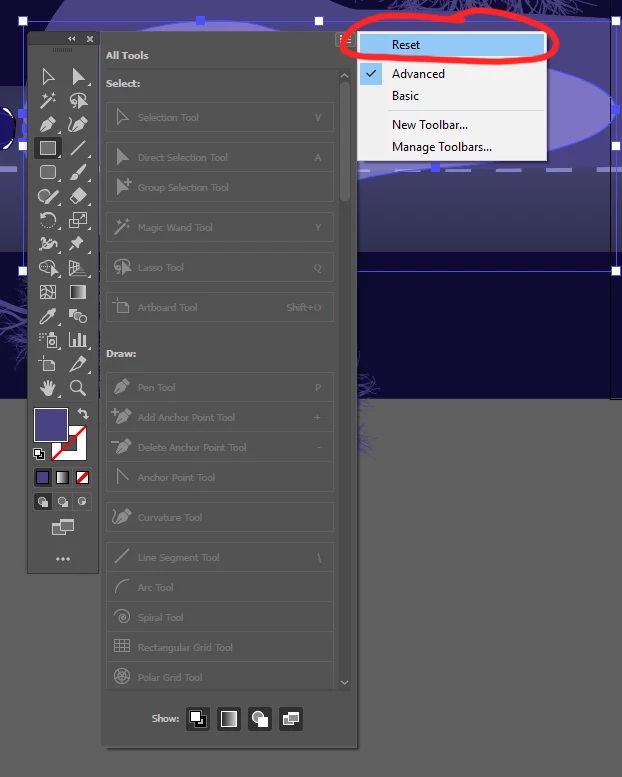
The tools have been nomadic since the CC2019 update. Click the three dots at the bottom and reset it here:

3 replies

mjmdvm
Inspiring
December 4, 2018

This is a bug in Illustrator CC 2019( Windows 10 & Mac) that's been brought to Adobe's attention in the bug reporting forums. According to Adobe it is going to be fixed "soon" in the next update.

The wandering toolbar got so ridiculous that it forced me to go back to Version 2018 yesterday.  I was having to reset the toolbars every 1-2 minutes!  Between this bug, the locks/crashes and the broken file associations, I might just wait until the 2020 version  . For me, the 2018 versions of AI and PS are a LOT faster and more stable.

Windows 10 Desktop Version 10.0.17134 Build 17134 ( x64)

Intel(R) Core(TM) i7-7700 CPU @ 3.60GHz,

16 GB RAM

NVIDIA GeForce GTX 1070

Wacom Intuos Pro tablet

Bill Silbert
Community Expert
Community Expert
December 4, 2018

The tool panel in Illustrator CC 2019 is completely editable. This edibility can lead to errors like yours happening accidentally. For more information about this feature please see this you tube video Illustrator CC 2019 (23) : Customizable toolbars tutorial - YouTube .

Doug A Roberts
Community Expert
Doug A RobertsCommunity ExpertCorrect answer
Community Expert
December 4, 2018

The tools have been nomadic since the CC2019 update. Click the three dots at the bottom and reset it here:

Participant
December 4, 2018

Thanks Doug, and other responders!! I was tearing my hair out!! Just to work out how to get my central bounding box handles back (for lines) so I can extend them now, and I might be back to square one!!!

Much obliged!!