
Participant
October 5, 2022
Answered

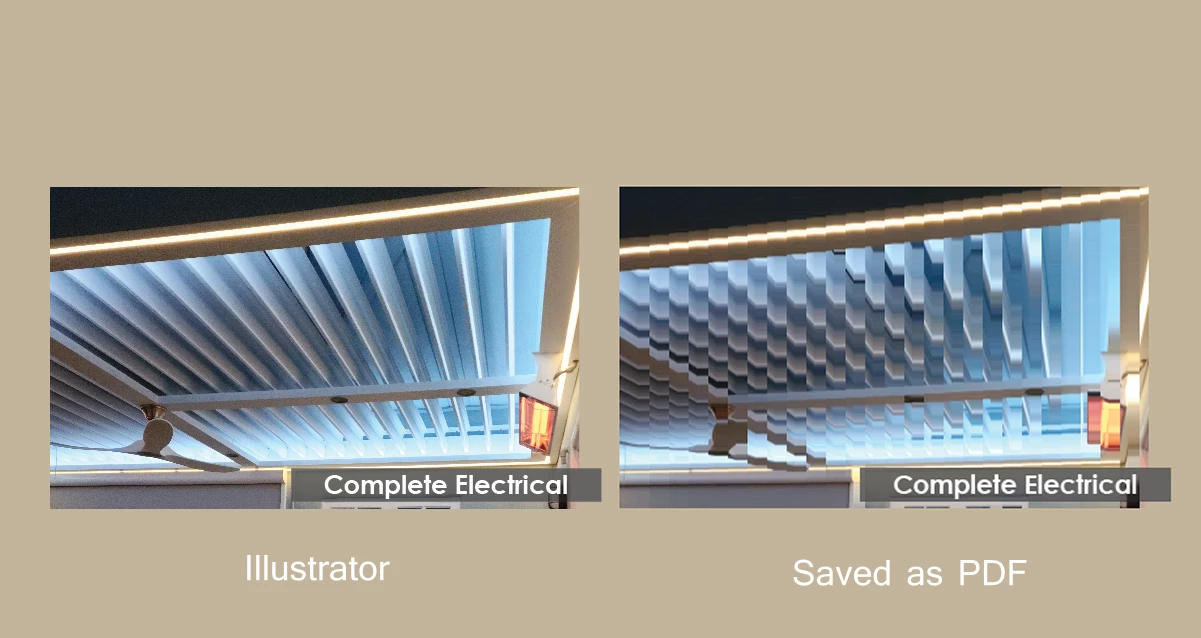
Whenever I save my files from Illustrator to PDF, the cropped, downsized images are pixelated
  • October 5, 2022
  • 3 replies
  • 793 views

Hello, I am working on a project on Illustrator. I am working with a very large file. 

Whenever I save my Illustrator file to PDF, this one specific picture becomes pixelated and distorted, and I do not know how to fix it. 

This topic has been closed for replies.
Correct answer marliton

Hi. Please check the PDF presets section in this link, it could be helpful: https://helpx.adobe.com/illustrator/using/creating-pdf-files.html


3 replies

marliton
Community Expert
marlitonCommunity ExpertCorrect answer
Community Expert
October 5, 2022

Hi. Please check the PDF presets section in this link, it could be helpful: https://helpx.adobe.com/illustrator/using/creating-pdf-files.html


Marlon Ceballos
Anshul_Saini
Community Manager
Community Manager
October 5, 2022

Hi @Michael Angel25254622l0ir,


Sorry to hear about the trouble you are facing. Would you mind trying changing the compression to " Do Not Downsample" & "None" in PDF settings? Also, ensure the linked images are not missing.

Note: This may result in larger file size.


If it doesn't help, would you mind confirming the exact version of Illustrator along with the details asked by Ton?


Thanks & Regards,

Anshul Saini

Ton Frederiks
Community Expert
Community Expert
October 5, 2022

What PDF Preset do you use? Smallest file size compresses images heavily.