Participating Frequently
May 22, 2020
Answered

Where can I find the flame icons in Illustrator?

  • May 22, 2020
  • 3 replies
  • 2885 views

So im looking for those icons that looks like a flame I dont know how to find it can anyone help?


{Renamed by MOD}

This topic has been closed for replies.
Correct answer Srishti_Bali

Hi Shiraz,


I am assuning you are looking for Fire Symbol in Symbol Libraries. If yes, then please try following these steps and let us know how it goes:
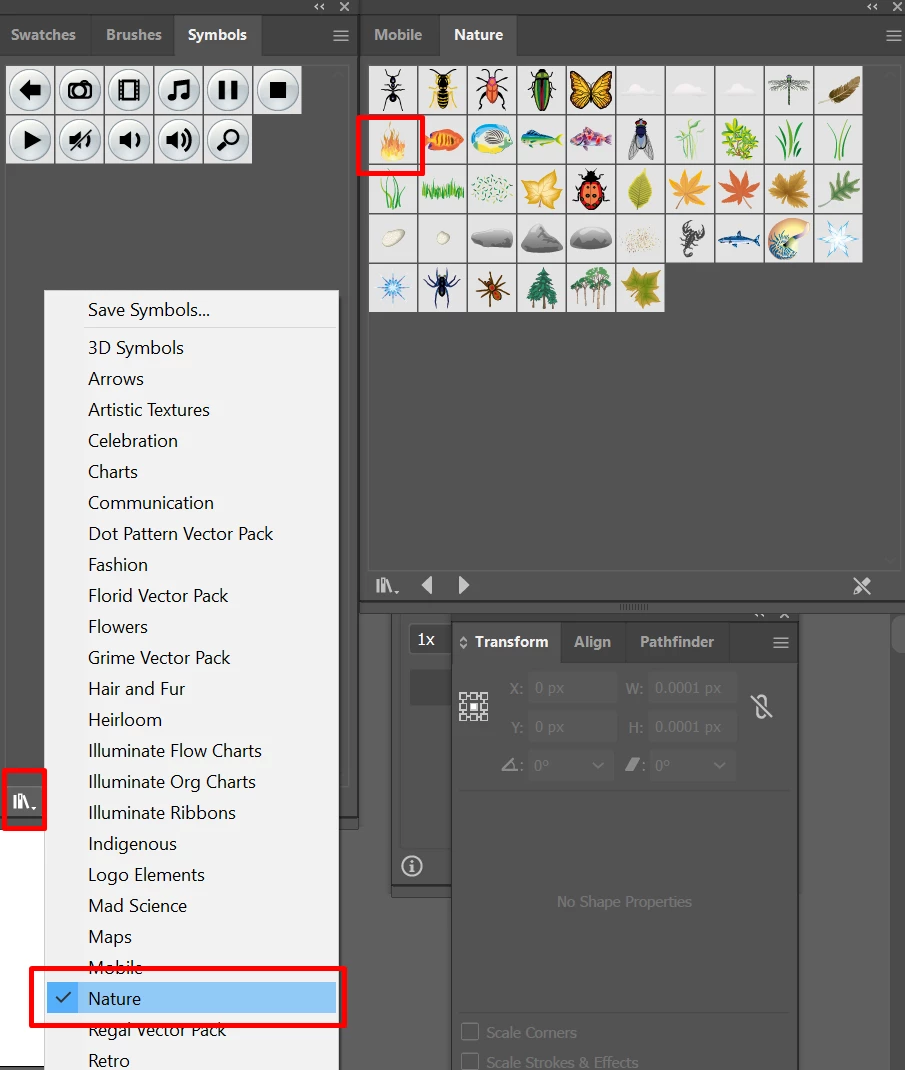
  • Go to Window > Symbols.
  • Click on the small icon on bottom left coner of Symbols Panel 
  • Select Nature and you will find symbol there.

If that's not what you are looking for, please share more information about the situation.


Regards,

Srishti


3 replies

Srishti_Bali
Legend
May 26, 2020

We have been waiting for your response to this query. Please update the discussion if the issue is resolved or if you have any further query.


Thanks!

Srishti_Bali
Srishti_BaliCorrect answer
Legend
May 22, 2020

Hi Shiraz,


I am assuning you are looking for Fire Symbol in Symbol Libraries. If yes, then please try following these steps and let us know how it goes:

  • Go to Window > Symbols.
  • Click on the small icon on bottom left coner of Symbols Panel 
  • Select Nature and you will find symbol there.

If that's not what you are looking for, please share more information about the situation.


Regards,

Srishti


Kurt Gold
Community Expert
Community Expert
May 22, 2020

Do you mean a specific tool icon in Illustrator?


The icon of the Symbol Sprayer tool looks at least a bit like a flame-thrower. Is that what you are looking for?