Answered

This topic has been closed for replies.
Hi @J L Kyle,
Thanks for reaching out. The "Align to" drop-down menu in Adobe Illustrator has undergone a minor UI change. Starting from Illustrator 2022, all alignment options are now displayed side by side instead of being grouped in a drop-down menu.
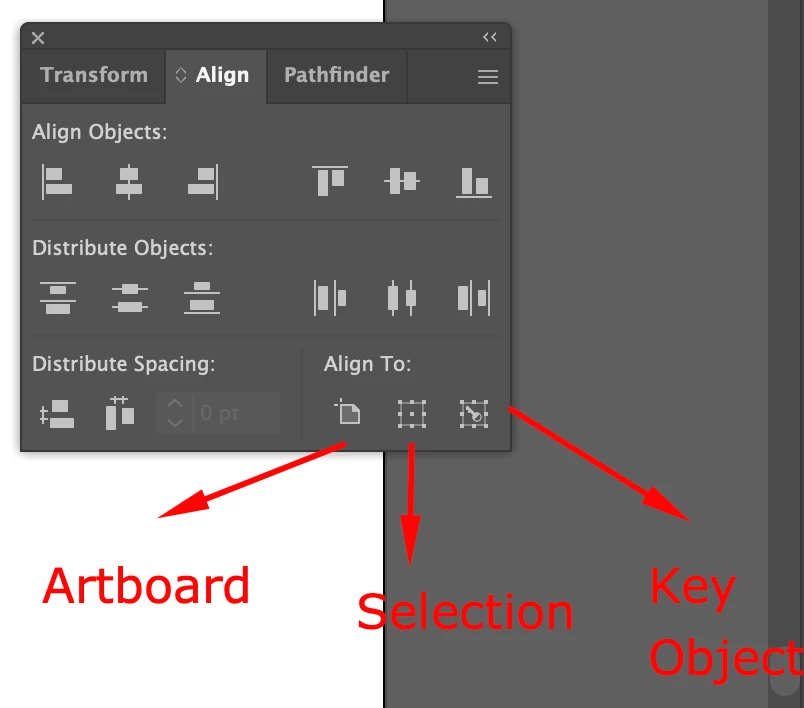
You can find them directly on the Align panel or Control bar, making it easier and quicker to access the alignment options.
However, "Align to" options are still available in a drop-down menu located on the Control bar.
If you have any more questions or need further assistance, feel free to ask. Happy designing!
Best,
Anshul Saini
Sign up
Already have an account? Login
To post, reply, or follow discussions, please sign in with your Adobe ID.
Sign inSign in to Adobe Community
To post, reply, or follow discussions, please sign in with your Adobe ID.
Sign inEnter your E-mail address. We'll send you an e-mail with instructions to reset your password.
 AdChoices