Inspiring
Jun 22, 2023 8:19 PM UTC
Answered

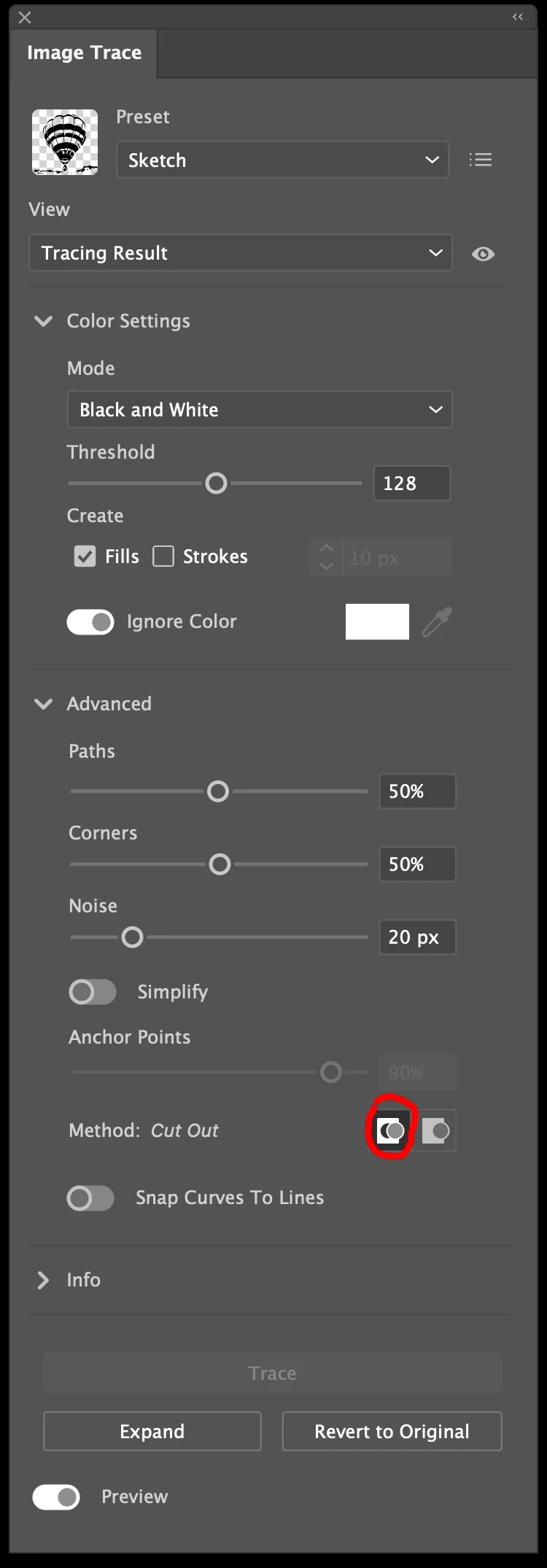
Where is the "ignore white" option on Image Trace?

Where is the "Ignore White" option on Image Trace?


This topic is closed to new replies. Start a new post to keep the conversation going.
Mike_Gondek10189183
Mike_Gondek10189183Correct answer
Community Expert
Jun 23, 2023 12:39 AM UTC

Also make sure you have cutout on


4 replies

Mike_Gondek10189183
Community Expert
Mike_Gondek10189183Community ExpertCorrect answer
Community Expert
Jun 23, 2023 12:39 AM UTC

Also make sure you have cutout on


Translate
Participating Frequently
Jul 21, 2023 3:34 AM UTC

Thanks Adobe, you have just made things harder than they were previously!

Translate
Monika Gause
Community Expert
Community Expert
Jun 22, 2023 8:24 PM UTC

You need to turn on the Ignore Color option and then select white


Translate
Ton Frederiks
Community Expert
Community Expert
Jun 22, 2023 9:07 PM UTC

But that does not work for grayscale images with black and white as colors.

Translate