DustinCanup
Participant
June 13, 2017
Answered

White jagged lines bordering all of my text and shapes?

  • June 13, 2017
  • 2 replies
  • 341 views

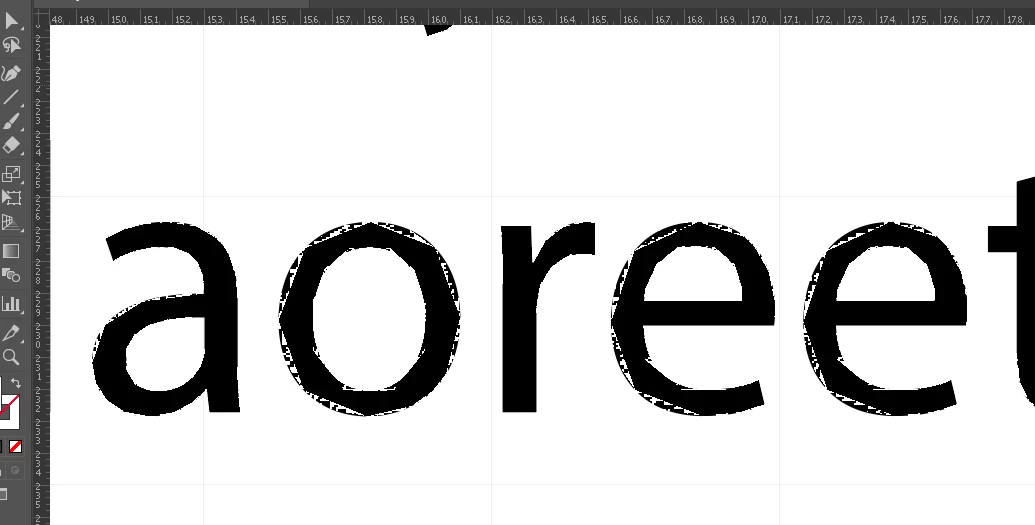
My Illustrator was working normally until one day I noticed that any text or anything I would try to draw would all have really jagged, pixelated lines. When I zoomed in all the way I saw that there was a strange white jagged border superimposed over everything. I have no idea what this is, and I would love any assistance in removing it/turning it off. Thanks in advance.
    This topic has been closed for replies.
    Correct answer Monika Gause

    Try View > Preview on CPU

    2 replies

    Ton Frederiks
    Community Expert
    Community Expert
    June 13, 2017

    I have seen many posts mentioning this problem recently, I suspect it is the most recent update causing this.

    You can report it (include details about your OS and graphic card) here:

    Illustrator Feature Request/Bug Report Form

    Monika Gause
    Community Expert
    Monika GauseCommunity ExpertCorrect answer
    Community Expert
    June 13, 2017

    Try View > Preview on CPU

    DustinCanup
    Participant
    June 13, 2017

    That was it! You're amazing! I've been going over every font, layer, preference, and setting trying to turn that off. Thank you SO much!

    Monika Gause
    Community Expert
    Community Expert
    June 13, 2017

    You're welcome.

    GPU support is indeed a preference that you can turn off permanently.