

Inspiring
March 2, 2017
Question

White lines in pattern tiles

  • March 2, 2017
  • 3 replies
  • 2627 views

Hi There

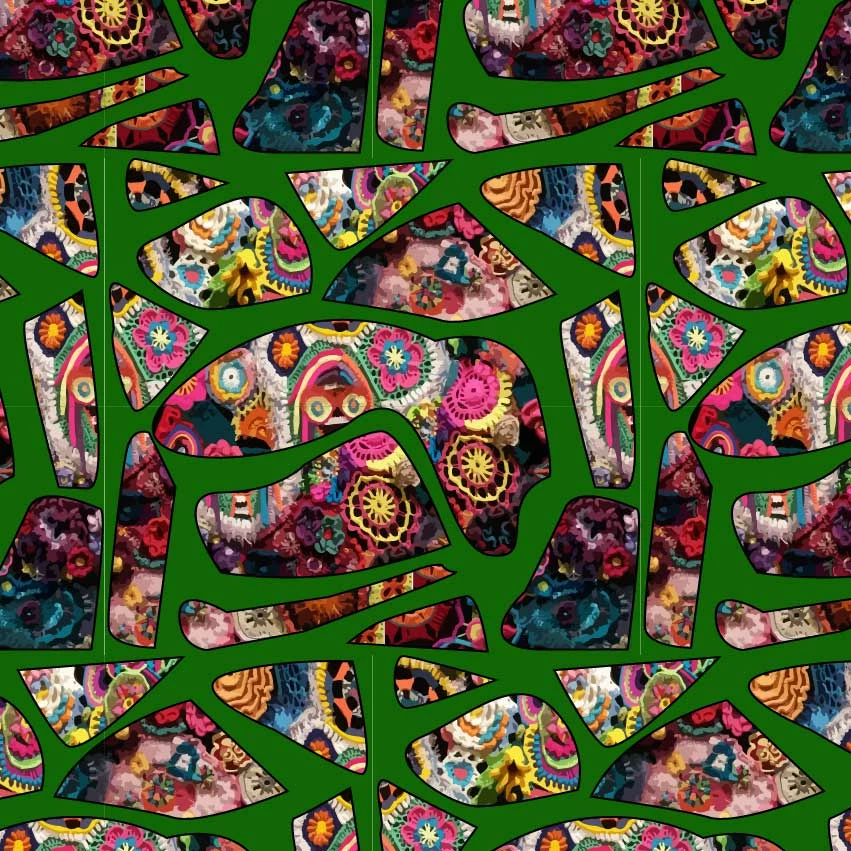
Having trouble getting rid of white lines in my repeat patterns. Turning Anti-aliasing on and off does nothing to change the output. My pix look terrible. Have tried playing with CPU/GPU/Pixel preview and nothing has worked yet. Any ideas on how to get rid of it? Thanks in advance. Cheers Bec
This topic has been closed for replies.

3 replies

Bec MacAuthor
Inspiring
March 5, 2017

Thanks Ton I will give it a go! Cheers

Ton Frederiks
Community Expert
Community Expert
March 3, 2017

In the Appearance Panel, you can try to add a new solid green fill (same as the green background color in the pattern) below the pattern fill.

Monika Gause
Community Expert
Community Expert
March 2, 2017

That pattern is made up of placed raster images, correct?

Please check the base artwork. Most probably it has transparent pixels at the edges.

Bec MacAuthor
Inspiring
March 2, 2017

rasters were imaged traced

Monika Gause
Community Expert
Community Expert
March 2, 2017

Image trace might also not be precise. You need to check precision. Your issue is most likely not anti-aliasing, but precision.