Participant
May 11, 2018
Answered

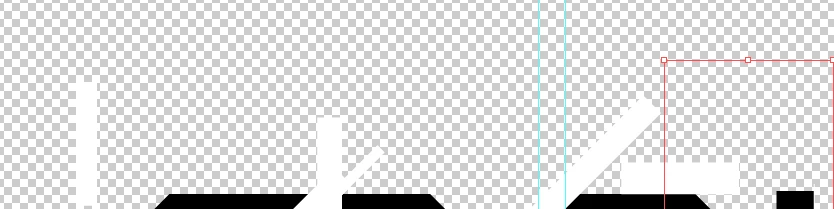
White rectangles appear on transparent background.

  • May 11, 2018
  • 2 replies
  • 2379 views

Hello.
I am new to Adobe Illustrator. I made a text logo but i did many edits using white rectangles. When I exported my project to PNG and when I opened the photo i could see the rectangles. The background was transparent btw. When I go to show transparency grid I can clearly see the text and the white rectangles.

How to fix this and what could I do to avoid this in the future.

Thank you.
This topic has been closed for replies.
Correct answer pixxxelschubser

Maybe do you know the Pathfinder Panel (the panel and NOT the effect)?

You have to use it to substract your white rectangles from you black 'type' paths before exporting – means you should clean your Illu file. (I'm sure you did have convert your text to outlines, otherwise you should do this before using the pathfinder.)

Have fun

2 replies

pixxxelschubser
Community Expert
pixxxelschubserCommunity ExpertCorrect answer
Community Expert
May 11, 2018

Maybe do you know the Pathfinder Panel (the panel and NOT the effect)?

You have to use it to substract your white rectangles from you black 'type' paths before exporting – means you should clean your Illu file. (I'm sure you did have convert your text to outlines, otherwise you should do this before using the pathfinder.)

Have fun

anna33344Author
Participant
May 11, 2018

I heard of Pathfinder. I found it confusing at the beginning but I fixed it. Thank you

Myra Ferguson
Community Expert
Community Expert
May 11, 2018

If you want to use the white shapes to cut out from the black, select all then use the ShapeBuilder tool (Shift + M) and hold down Alt while dragging over them and leaving the black.

If you want the background to be white, skip the above and right-click to Export selection. In the Export for Screens dialog in the Formats section on the right, click on the settings gear. Change Background Color from Transparent to White.

anna33344Author
Participant
May 11, 2018

I actually wanted to delete black from the text and used the white rectangles. That Shift+M method just deletes the rectangle and the black is still there.

Myra Ferguson
Community Expert
Community Expert
May 11, 2018

Shape Builder deletes (or adds when you use it without the Alt) what you tell it to delete. So if you want to remove the black,  select the shapes, select Shape Builder, then Alt + drag (or click, both work) on the black shapes.