Participant
December 17, 2024
Question

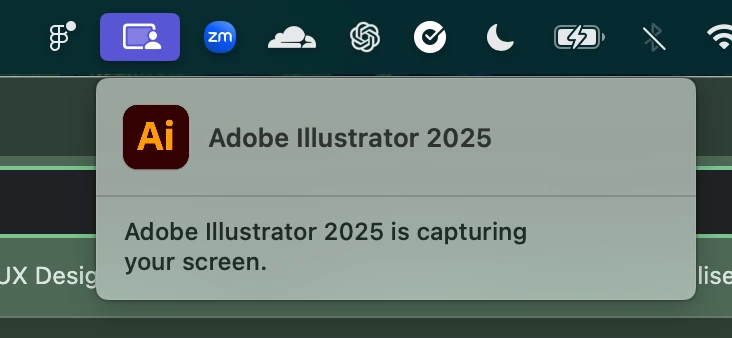
Why am I getting "Adobe Illustrator 2025 is recording your screen" at all times, even when closed?

  • December 17, 2024
  • 5 replies
  • 10689 views

This appeared in my mac's menu bar, somewhat randomly, while I had illustrator open. This was not while using the eyedropper tool, which I've seen mentioned elsewhere as the reason this might appear. It was actually just while I had a project open in a window, but was working on something else in an unrelated app.

I quit Illustrator, which got rid of it in the menu bar, but it again reappeared randomly the next time I had Illustrator open. This time, when I closed the app, the "Adobe Illustrator 2025 is recording your screen" doesn't go away.

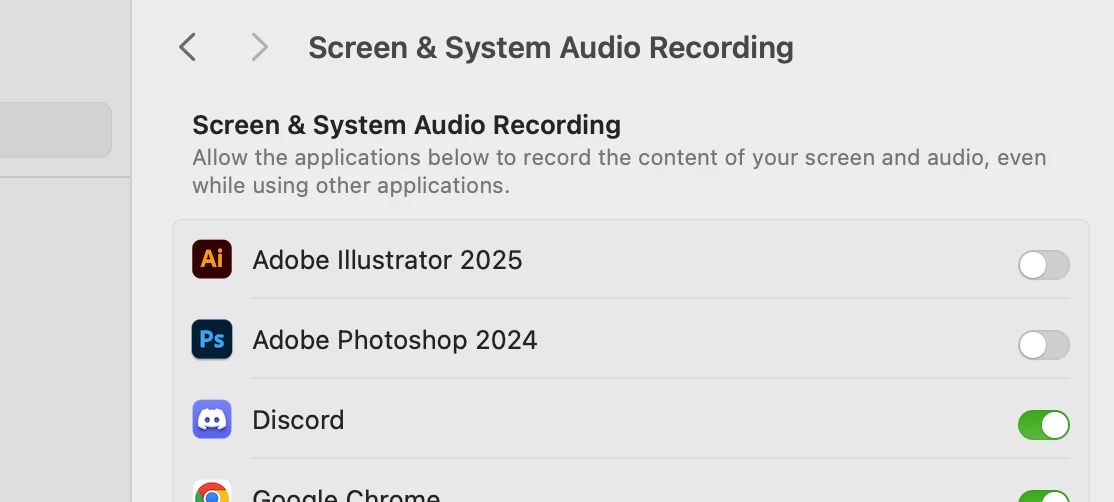
I checked my settings/permissions, and I haven't granted Illustrator permission to record my screen in the first place, so this feels quite shady. Can anyone help explain what's going on here/why? 
 

5 replies

Anshul_Saini
Community Manager
Community Manager
March 18, 2025

Hi All,


I am able to replicate this behavior on my end, even after denying screen recording permissions. After checking with the product team, they’ve confirmed that Illustrator uses Apple’s screenshot API to pick colors (CGDisplayCreateImageForRect API to read pixels for colors). This allows our apps to capture a 1 px pixel’s color within the app window itself or outside if permission is granted. Even if screen recording permissions are denied, our apps can still pick colors from within its window.


With the recent changes introduced by Apple in macOS Sequoia, new privacy and security notifications now appear when an app accesses screen content. It can be 1 pixel, and still, this notification will pop up. This is why you see the “Adobe Illustrator 2025 is capturing your screen” message— this is an expected behavior. macOS notifies users whenever an app is accessing screen content, even if it’s just for picking the color of a single pixel. So, even though you’ve denied permission for Illustrator to pick a pixel color outside the app, it can still capture colors within the Illustrator window, and this notification will appear. There’s nothing to be concerned about.


Moreover, we have raised an internal ticket with Apple regarding this. Also, this is being triggered by ArtOnPathBrush, EyeDropper, ColorPicker, and ScatterToolBrush plugins.


Let me know if you need further clarification!


Best,

Anshul

Participant
May 2, 2025

so this is helpful- except for it doesnt explain why it continues after closing the app.

Monika Gause
Community Expert
Community Expert
May 2, 2025
quote

so this is helpful- except for it doesnt explain why it continues after closing the app.


By @Matthew37097566bzzb


So maybe ask Apple why this is still appearing?

Participant
February 27, 2025

I have the same issue and there is no way to disable it because it is ignoring my security settings on Mac.

Participant
January 30, 2025

I am having the same  issue with Premiere Pro 2025. Nothing seems to work. Is this even legal?


Participating Frequently
December 18, 2024

I have the same issue and posted on the illustrator user voice forum. 
I have not granted permissions.

It happens sporadically. Not related to the eyedropper.

Only happens when illsutrator is open.
MacOS 15

Abhishek Rao
Community Manager
Community Manager
December 17, 2024

Hi @Sam25718151jwi2,


Thanks for sharing the details and the screenshots. Could you let us know which version of macOS you’re currently using?

This message often appears when Adobe Illustrator needs temporary screen access for tools like the Eyedropper or Color Picker, which detect colors outside the Illustrator canvas. However, if it's appearing persistently, you can try the following steps:

1. Check System Permissions:

 - Go to System Settings > Privacy & Security > Screen & System Audio Recording.

 - Disable screen recording permission for Illustrator. Restart Illustrator and check if the issue persists.

2. Reset Illustrator Preferences:

 - Close Illustrator.

 - Hold Option + Command + Shift while reopening the app. This will reset the preferences to default. Reference: How to set preferences in Illustrator

3. If Illustrator still appears as recording after being closed, rebooting can stop any stuck background processes.


Let me know how it goes, or if the issue persists, I’ll assist you further!


Thanks, 

Abhishek Rao 

Participant
December 17, 2024

Hey Abhishek, thanks for the speedy response!

I'm on Sequoia version 15.0 (24A335);

I'll follow these steps and report back if the issue still persists. It took a day or so last time for the message to reappear, so I'll repond once I've had a reasonable window to properly test.

Is there any reason why this message would be prompted in the first place, given that at no point was Illustrator granted permission in my Mac's settings to record my screen? That's the main point of concern for me

Anubhav M
Community Manager
Community Manager
December 18, 2024

Hello @Sam25718151jwi2,

Thank you for your confirmation. Apple has rolled out the feature for Managing access to screen recording on Mac
beginning with macOS Catalina (10.15) and it cannot be activated for an application without user consent. Learn more here: (https://adobe.ly/3Bwgvjf).

I want to reiterate that this is only necessary in Illustrator if you wish to utilize the eyedropper tool to pick colors from outside the Illustrator application window. If you do not require it, you can disable it.

Please don’t hesitate to reach out if you have further inquiries or need support. We'd be glad to assist.

Anubhav