
MrBiltong
Known Participant
January 30, 2023
Answered

Why are Whites not White after 3D effect is applied?

  • January 30, 2023
  • 2 replies
  • 1804 views

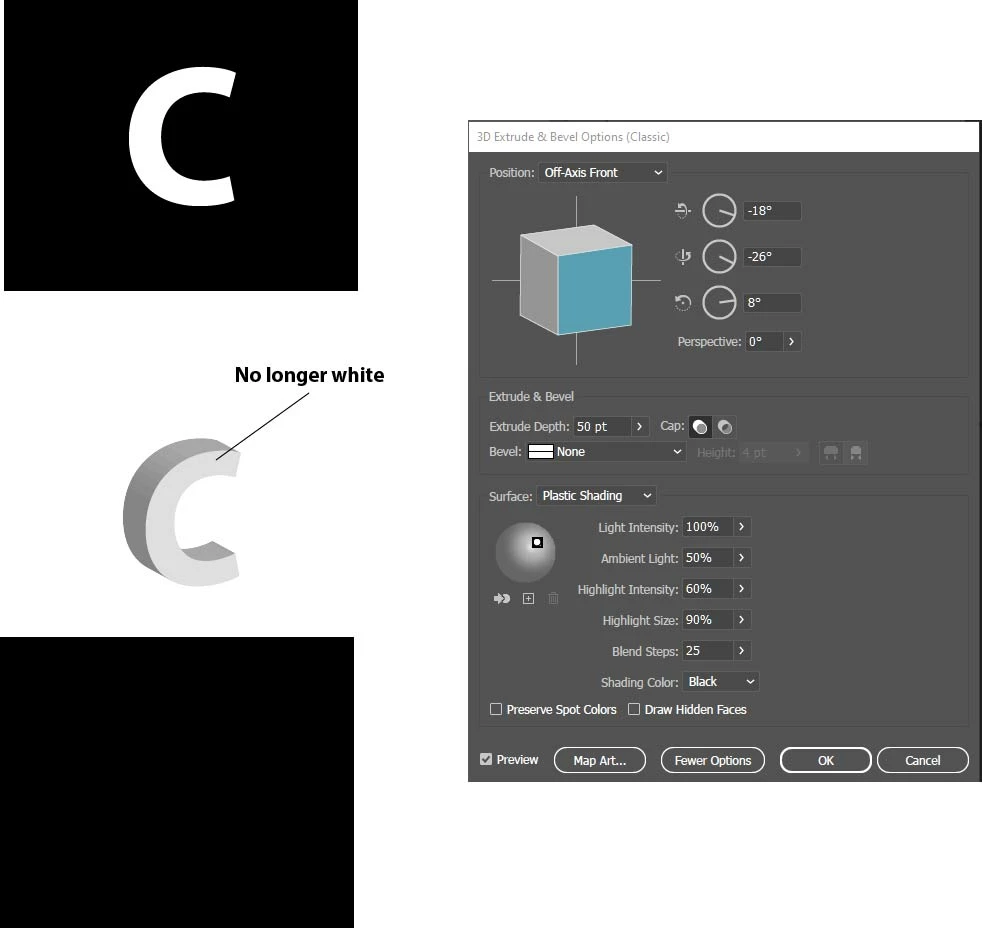
Changing White Text to 3D using Extrude and Bevel Classic - seems to change the white text to Grey.

How do I retain the white or change it back to white - this occurs not only with white text but with any colour.
This topic has been closed for replies.
Correct answer Kevin Stohlmeyer

Check your lighting settings. Your light is set to plastic shading which gives the object a matte look. Also your light is off-front-top meaning its not straight on to your surface. Adjust those settings and you can make it closer to white.

2 replies

Kevin Stohlmeyer
Community Expert
Kevin StohlmeyerCommunity ExpertCorrect answer
Community Expert
January 30, 2023

Check your lighting settings. Your light is set to plastic shading which gives the object a matte look. Also your light is off-front-top meaning its not straight on to your surface. Adjust those settings and you can make it closer to white.

MrBiltong
MrBiltongAuthor
Known Participant
January 30, 2023

Thank you for your swift assistance - don't know what plastic shading is, but I have Google and will check it out!!  Thanks again!

Monika Gause
Community Expert
Community Expert
January 30, 2023

You will need to adjust the lighting with the dots on the globe in the bottom of the dialog box.

MrBiltong
MrBiltongAuthor
Known Participant
January 30, 2023

Thanks very much - it makes sense and has worked somewhat!!