
Why Can't I Export a 300dpi JPEG out of Illustrator?
This seems to be a recurring discussion for years now, but the last conversations I could find were from a couple years ago. I'm hoping to reopen it with more insights.
I've been using illustrator for a few years now, and have never run into this issue until today. I design magazine ads, which freqently require a 300dpi JPEG.
Today, an editor let me know the files i sent were 72dpi, adn asked for me to resend them. I thought, this is strange... I could have sworn I remembered creating the file and exporting it at 300? So I went back to check and sure enough, I did.
Replicating my steps:
- I create a new CMYK file at 300dpi.
- Confirmed that the hero imaged placed in the file is in fact 300 dpi also
- File>Export As
- Selected JPEG, Use Artbords, then I get the following screen where I choose CMYK 300ppi
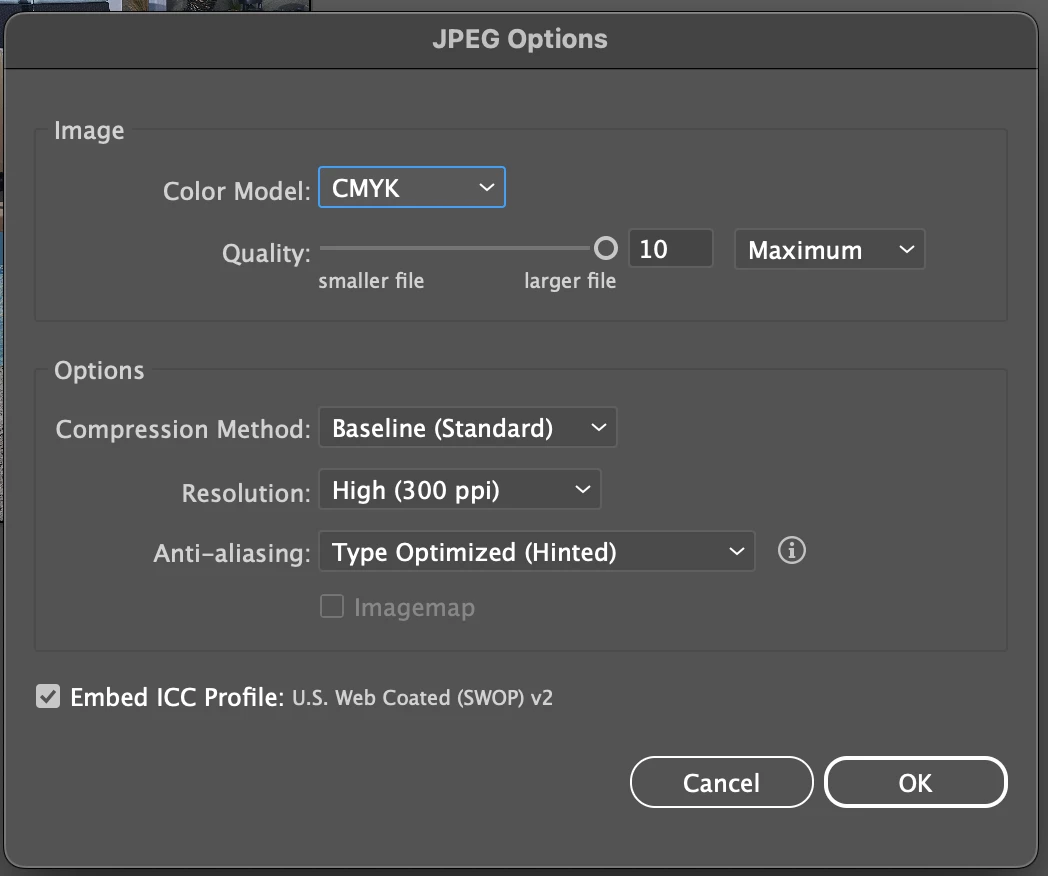
- I click "OK" and when I go to check the file, it's blurry, and Preview is reading it as a 72dpi image.
What is actually going on here? And what is the solution for those who need a 300dpi JPEG? After reading the older community conversations, others have suggested that the "export" option is intended for digital use. Which made me scratch my head, because even though the export screen above give you ppi instead of dpi, it also gives you the CMYK option. I find that a bit contradictory.
Furthermore, in the older posts I read, people suggest using "Save As" instead. However, Save As doesn't give you the option to export as JPEG.
So, again I ask, what is the solution here for people who need 300dpi JPEG graphics?
Thank you all in advance for your advice.


 AdChoices