
Inspiring
February 4, 2023
Answered

Why do my Jpg and png files appear different colors when I export from Illustrator?

  • February 4, 2023
  • 4 replies
  • 16507 views

Hi all,  I am wondering when I export png and jpg from same Illustrator file, why do the colors look different? See screenshots.


Using Illy CC version, document color mode RGB, color profie sRGB.  I don't have the best with color management knowledge, but I'm trying! Thanks for any advice & tips.
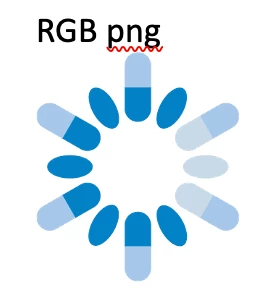
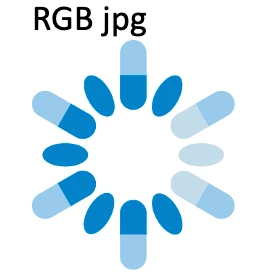
 

Correct answer Monika Gause

PNGs are exported without embedding a color profile. You need to open the PNG in Photoshop and attach sRGB profile. This might make a change. Can you try that?


ALso: can you show us your color management options? And: Which profile do you use on your monitor?

4 replies

Participant
January 21, 2025

I actually found a way to solve this without going into Photoshop, by changing the Proof Setup to RGB. When I did it, all colors in my artwork changed to those different weird colors I use to get when exporting, so I had to recolor my artwork by selecting the right colors from my Libraries. After exporting the project again in PNG, there were no issues anymore.


Jacob Bugge
Community Expert
Community Expert
February 5, 2023

Jillo,


"I need to provide the client with another png file for printing (CMYK) purposes"


To avoid the lack of colour consistency between print and screen uses across all the PNGs, which will undoubtedly be greater than that between non sRGB PNGs and JPEGs, you may be happier if you start in CMYK and:


1) Create the print version of the artwork as a raster image if you must, in one of the formats that support CMYK (excluding JPEG), but better just as the original vector artwork;


2) In a new RGB document, use the original vector artwork to create a screen version as SVG if applicable, otherwise as PNG (sRGB).


Ton Frederiks
Community Expert
Community Expert
February 4, 2023

What is your document color profile? You can select to display it at the bottom of your document window.

Monika Gause
Community Expert
Monika GauseCommunity ExpertCorrect answer
Community Expert
February 4, 2023

PNGs are exported without embedding a color profile. You need to open the PNG in Photoshop and attach sRGB profile. This might make a change. Can you try that?


ALso: can you show us your color management options? And: Which profile do you use on your monitor?

Inspiring
February 4, 2023

I think that did the trick, thank you! Now, will I need to do this for all png files? I need to provide the client with another png file for printing (CMYK) purposes. 

Monika Gause
Community Expert
Community Expert
February 4, 2023

PNG files cannot be in CMYK, it's not supported by the file format. So for printing you should check in with the client what kind of file format they prefer. Should be a PDF, but maybe they want something different.


Yes, you will need to attach a color profile to every exported PNG unfortunately.