

All Things Creative
Inspiring
September 7, 2017
Answered

Why do my photos end up downsized when importing from PS to AI? 😕

  • September 7, 2017
  • 3 replies
  • 2657 views

I'm sure this is one of those "easy obvious" answers ...

Every time I resize a photo in PS and go to place it in AI (replacing another photo) it never imports in at the exact size rather it resizes it slightly. I just did a photo that was cropped at 1.75 in Wide x 2.25 in High in PS and when I place in AI it comes in at 1.7501 in Wide x 2.2499 High.

Can someone point the lady to the solution ... BIG THANK YOU in advance!!!

    This topic has been closed for replies.
    Correct answer Mike_Gondek10189183

    Hey Mike,

    So I got all excited but ... BUT NOTHING ... MIKE YOU WIN THE PRIZE!!! THANK YOU SO. MUCH!!! ... I knew it was going to be something crazy like this ... where do I fly you to for your prize?   Thanks to everyone's input but Mike's the man on this one!!!
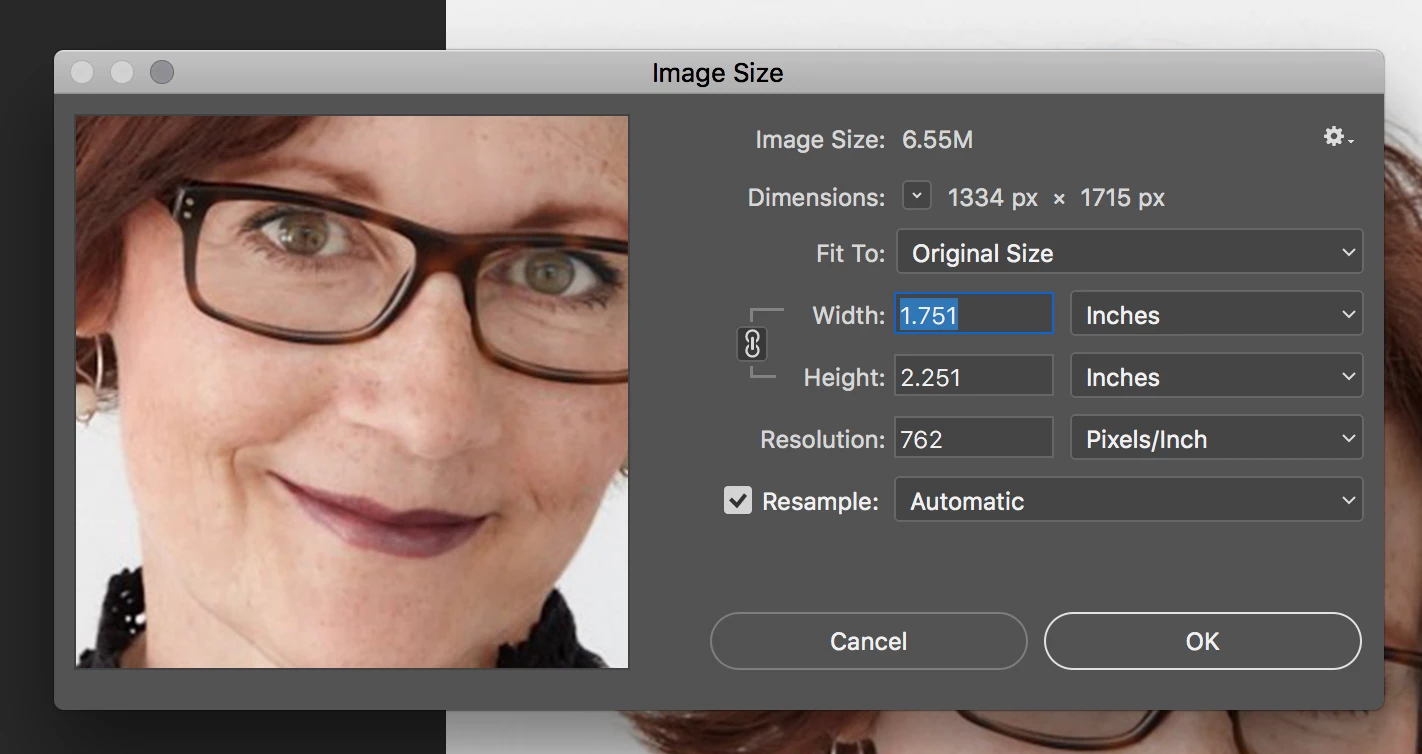
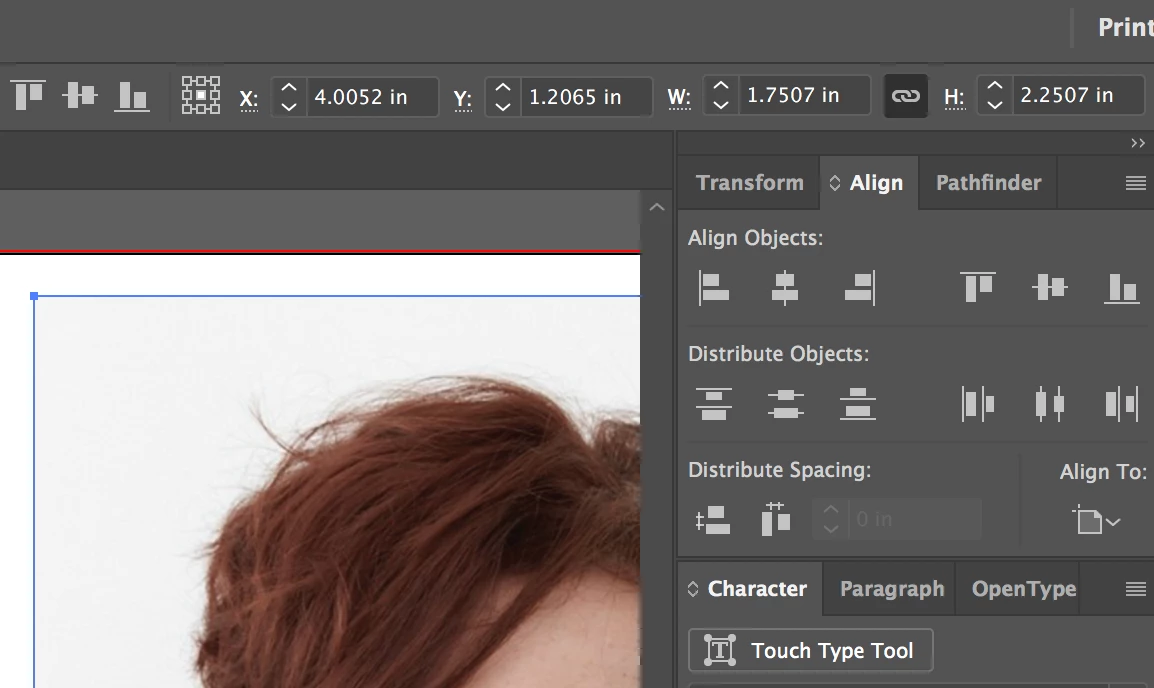

    Getting close, change your resolution to 300, then delete the "1" in 1.751 and you should be good.

    Quit your Photoshop  to lock in pixels/Inch. You may also need to tell us about how that image was created as the image might be tagged in px/cm instead of pixels/inch.

    Wow a plane flight for helping with one question how awesome. Big Island Hawaii sounds good.

    3 replies

    Legend
    September 11, 2017

    As I said, perhaps one of them is now showing more decimal places.

    All Things Creative
    Inspiring
    September 11, 2017

    Test Screen Name ... If you look at the screenshots you will see they're not consistent, granted its not a large difference but there shouldn't be any difference let alone random changes from doing the same thing twice. I never used to run into this prior to CC. Basically when I place a photo in AI I have to resize again a small amount but still have to do and that doesn't seem correct.

    angie_taylor
    Legend
    September 11, 2017

    have you tried typing in the values from AI into Photoshop to see if it will accept them? It might be a way to test it? Also, it wouldn't necessasarily be consistent as all image sizes are different. For example, an image may be 123.4567 in one application, the other application may round this up by .0003 to 123.457. If an image is 123.4569, it would only have to round up by .0001

    JonathanArias
    Legend
    September 8, 2017

    May i ask why are you placing photos on illustrator? Adobe indesign is really the correct tool to use to place photos and make a .pdf if that is what you are looking to do. just curious as to the workflow and end result you are looking for.

    All Things Creative
    Inspiring
    September 8, 2017

    I'm a graphic designer 20 yrs / based on the vector work I'm doing I prefer to do these in AI and its appropriate, I use ID when its multiple pages which isn't typically my workflow / projects. I do the bulk of the vector work in AI and finish with the required photo ... I never have had any issues doing this until CC and the only issue albeit small is that its resizing the photo a smidgen from PS to AI. I thought it was a very obvious feature that I was missing but now I'm starting to think differently.

    JonathanArias
    Legend
    September 8, 2017

    ahhhhh. ok i see. i am an indesign person for layout so i like to place my photos and vector into adobe indesign since the way to get this work work will be long like it seems from other peoples answers.. might want to change the workflow in my opinion

    Mike_Gondek10189183
    Community Expert
    Community Expert
    September 7, 2017

    Sounds like the dpi of your Photoshop file leaves you with a split pixels. You dpi need to be an even number, not a decimal.

    10/1000's of an inch  is a very small amount, but I totally understand and support anyone being precise.

    All Things Creative
    Inspiring
    September 7, 2017

    Hi Mike,

    I have all my photos set at 300 dpi ...

    Mike_Gondek10189183
    Community Expert
    Community Expert
    September 8, 2017

    What operating system? Do you have any third party software such as Avast Anti Virus which is know to add extra digits to Illustrator palettes.

    Can you post a copy of the image using dropbox or similar ftp link sharing.