This topic has been closed for replies.

3 replies

KShinabery212
Community Expert
Community Expert
September 9, 2022

Well they say that in the spring if Illustrator crawls out of its hole and sees its shadow we will have 6 more weeks of winter.

Joking.

Bad Ground Hog Day Joke.

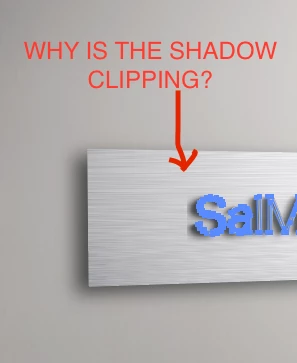
This is what is lame about Illustrator.  You added a drop shadow or blur effect.  And the space around it is not working. So you see that hard line. You can either play around with it and adjust it... eventually you will get it away. Or just do the shadow effect in Photoshop and make your life easier.

Let's connect on LinkedIn. https://www.linkedin.com/in/kshinabery/
Ares Hovhannesyan
Community Expert
Community Expert
September 9, 2022

There is option in 3d panel to change shadow properties. May be that can help 

Ton Frederiks
Community Expert
Community Expert
September 9, 2022

Did you try to increase the Shadow Bounds slider in the Lighting tab?

Kurt Gold
Community Expert
Community Expert
September 9, 2022

Can you share this Illustrator file for inspection?