Inspiring
April 28, 2025
Answered

Why doesn't cut & paste work in script?

  • April 28, 2025
  • 2 replies
  • 545 views

I've written a workaround for the inability to programmatically put arrowheads on lines. My script creates a numeric label and a line. It checks the current document for the required graphic style that has arrowheads. If it's not found, I present the File dialog so the user can open a "styles" file, in which the arrow graphic style resides. In that file, I generate an arrow by assigning the style to the line, and then select and cut the numeric label and the line with the arrowhead. Then I switch back to the original file and do a paste().


All of this appears to work, except nothing is pasted. It's baffling. If I eliminate the cutting and pasting from the script and do that manually, it works. Also, after the script runs, there's something on the clipboard because Paste is enabled in the menu. But it does nothing.


Any ideas? The code:

var arrowStyle;
    try
    {
        arrowStyle = workingDoc.graphicStyles.getByName("DiagramArrow");
        var arrowAndLabel = generateArrow();
    }
    catch (error)
    {
        var styleFile = File.openDialog('Select file with styles...');
        var styleDoc = open(styleFile);
        try
        {
            arrowStyle = styleDoc.graphicStyles.getByName("DiagramArrow");
            var firstArrow = generateArrow();
            firstArrow.label.selected = true;
            firstArrow.arrow.selected = true;
            cut();
            styleDoc.close();
            activeDocument = workingDoc;
            paste();
        }
        catch (error)
        {
            alert("DiagramArrow style not found.");
            return;
        }
    }

    redraw();

    function generateArrow()
    {
        // Generate the arrow.
        var w = app.activeDocument.width;
        var h = - app.activeDocument.height;
        var pointTextRef = activeDocument.textFrames.add();
        pointTextRef.contents = nextNbr;
        pointTextRef.name = "arrowLabel_" + nextNbr;
        textPosX = activeDocument.width / 2;
        textPosY = -(activeDocument.height / 2) - (10 * nextNbr);
        pointTextRef.top = textPosY;
        pointTextRef.left = textPosX;
        var arrowPath = app.activeDocument.pathItems.add();
        var lineXOffset = pointTextRef.width + 5;
        var lineYOffset = 5;
        var lineLen = 20;
        arrowPath.setEntirePath([[textPosX + lineXOffset, textPosY - lineYOffset], [textPosX + lineXOffset + lineLen, textPosY - lineYOffset - lineLen]]);
        arrowPath.stroked = true;
        arrowPath.strokeWidth = 3;
        arrowPath.name = "arrow_" + nextNbr;
        try
        {
            arrowStyle.applyTo(arrowPath);
        }
        catch (error)
        {
            alert("Couldn't apply arrow style.");
        }

        return {label: pointTextRef, arrow: arrowPath};
    }
Correct answer m1b

Hi @Thomas_Calvin I never use Cut, Copy and Paste when scripting unless absolutely necessary (because it changes the user's clipboard), but if you do, I strongly suggest you use app.copy() and app.paste().


This is the way I would approach the task of loading a graphic style from another document. See if it helps in your case.

- Mark


/**
 * @file Load A Graphic Style.js
 *
 * Example showing one approach to loading a graphic style.
 *
 * @author m1b
 * @version 2025-04-29
 * @discussion https://community.adobe.com/t5/illustrator-discussions/why-doesn-t-cut-amp-paste-work-in-script/m-p/15294229
 */
(function () {

    // NOTE: for this example I have my graphic style "DiagramArrow" in another
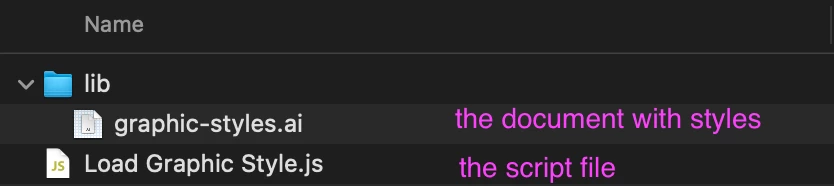
    // document (not necessarily open) called "graphic-styles.ai" in the "lib" subfolder.
    // See documentation for the parameters of `loadGraphicStyle` function: you could
    // otherwise pass it a full path or a Document.

    var styles = loadGraphicStyle('lib/graphic-styles.ai', app.activeDocument, ['DiagramArrow']);

    if (!styles)
        return alert('Failed to load graphic styles.');

    var diagramArrowStyle = styles['DiagramArrow'];

    if (!diagramArrowStyle)
        return alert('Failed to load "DiagramArrow" graphic style.');

    // do things, knowing that the "DiagramArrow" style is available
    // ...

})();

/**
 * Load graphic styles from one document into another.
 *
 * As a workaround for the limited methods
 * of `ArtStyle`, we apply the target style
 * to a temporary page item and then duplicate
 * that item across to `destinationDoc`.
 * 
 * Example usage:
 *   var styles = loadGraphicStyle(
 *                    '/lib/graphic-styles.ai',
 *                    app.activeDocument,
 *                    ['Double-headed Arrow', 'Big Box']
 *                );
 * 
 * How to use the returned object:
 *   var arrowStyle = styles['Double-headed Arrow'];
 *   var boxStyle = styles['Big Box'];
 *
 * @author m1b
 * @version 2025-04-29
 * @param {Document|String} sourceDoc - a document, or a path to a document, or the filename of a document in the same folder as this script.
 * @param {Document} destinationDoc - the destination for the loaded style.
 * @param {String|Array<String>} names - the name (or names, if array) of graphic styles to load from source document.
 * @returns {Object} - an object containing reference to the loaded graphic styles, accessed using the style name.
 */
function loadGraphicStyle(sourceDoc, destinationDoc, names) {

    var sourceIsDocument = 'Document' === sourceDoc.constructor.name;

    if (
        'String' === sourceDoc.constructor.name
        && File(File($.fileName).parent + '/' + sourceDoc).exists
    )
        // find file in same folder as this script
        sourceDoc = File(File($.fileName).parent + '/' + sourceDoc);

    if (
        'String' === sourceDoc.constructor.name
        && File(sourceDoc).exists
    )
        // sourceDoc was a valid path
        sourceDoc = File(sourceDoc);

    if (
        'File' === sourceDoc.constructor.name
        && sourceDoc.exists
    )
        // open the source document
        sourceDoc = app.open(sourceDoc);

    if (!sourceDoc.hasOwnProperty('graphicStyles'))
        // couldn't derive a document
        return;

    if ('Array' !== names.constructor.name)
        // we need to iterate over all name(s)
        names = [names];

    for (var i = 0, style, temp, dup; i < names.length; i++) {

        style = getThing(sourceDoc.graphicStyles, 'name', names[i]);

        if (!style)
            // couldn't find style in sourceDoc
            continue;

        // create a temporary page item
        temp = sourceDoc.pathItems.rectangle(0, 0, 1, 1);
        style.applyTo(temp);

        //duplicate styled item to destination
        dup = temp.duplicate(destinationDoc, ElementPlacement.PLACEATEND);

        // cleanup
        dup.remove();

    }

    if (!sourceIsDocument)
        // we don't need sourceDoc anymore
        sourceDoc.close(SaveOptions.DONOTSAVECHANGES);

    // return all the loaded styles
    var loadedStyles = {},
        counter = 0;

    for (var i = 0, style; i < names.length; i++) {

        style = getThing(destinationDoc.graphicStyles, 'name', names[i]);

        if (!style)
            continue;

        loadedStyles[names[i]] = style;
        counter++;

    }

    if (counter > 0)
        return loadedStyles;

};

/**
 * Returns a thing with matching property.
 * If `key` is undefined, evaluate the object itself.
 * @author m1b
 * @version 2024-04-21
 * @param {Array|Collection} things - the things to look through.
 * @param {String} [key] - the property name (default: undefined).
 * @param {*} value - the value to match.
 * @returns {*?} - the thing, if found.
 */
function getThing(things, key, value) {

    for (var i = 0, obj; i < things.length; i++)
        if ((undefined == key ? things[i] : things[i][key]) == value)
            return things[i];

};

Edit 2025-04-29: improved function so that it can accept an array of graphic style names or a single name. The returned object of the function contains references to the styles and the script now shows how to access it. I also show the example using a subfolder:

2 replies

m1b
Community Expert
m1bCommunity ExpertCorrect answer
Community Expert
April 29, 2025

Hi @Thomas_Calvin I never use Cut, Copy and Paste when scripting unless absolutely necessary (because it changes the user's clipboard), but if you do, I strongly suggest you use app.copy() and app.paste().


This is the way I would approach the task of loading a graphic style from another document. See if it helps in your case.

- Mark


/**
 * @file Load A Graphic Style.js
 *
 * Example showing one approach to loading a graphic style.
 *
 * @author m1b
 * @version 2025-04-29
 * @discussion https://community.adobe.com/t5/illustrator-discussions/why-doesn-t-cut-amp-paste-work-in-script/m-p/15294229
 */
(function () {

    // NOTE: for this example I have my graphic style "DiagramArrow" in another
    // document (not necessarily open) called "graphic-styles.ai" in the "lib" subfolder.
    // See documentation for the parameters of `loadGraphicStyle` function: you could
    // otherwise pass it a full path or a Document.

    var styles = loadGraphicStyle('lib/graphic-styles.ai', app.activeDocument, ['DiagramArrow']);

    if (!styles)
        return alert('Failed to load graphic styles.');

    var diagramArrowStyle = styles['DiagramArrow'];

    if (!diagramArrowStyle)
        return alert('Failed to load "DiagramArrow" graphic style.');

    // do things, knowing that the "DiagramArrow" style is available
    // ...

})();

/**
 * Load graphic styles from one document into another.
 *
 * As a workaround for the limited methods
 * of `ArtStyle`, we apply the target style
 * to a temporary page item and then duplicate
 * that item across to `destinationDoc`.
 * 
 * Example usage:
 *   var styles = loadGraphicStyle(
 *                    '/lib/graphic-styles.ai',
 *                    app.activeDocument,
 *                    ['Double-headed Arrow', 'Big Box']
 *                );
 * 
 * How to use the returned object:
 *   var arrowStyle = styles['Double-headed Arrow'];
 *   var boxStyle = styles['Big Box'];
 *
 * @author m1b
 * @version 2025-04-29
 * @param {Document|String} sourceDoc - a document, or a path to a document, or the filename of a document in the same folder as this script.
 * @param {Document} destinationDoc - the destination for the loaded style.
 * @param {String|Array<String>} names - the name (or names, if array) of graphic styles to load from source document.
 * @returns {Object} - an object containing reference to the loaded graphic styles, accessed using the style name.
 */
function loadGraphicStyle(sourceDoc, destinationDoc, names) {

    var sourceIsDocument = 'Document' === sourceDoc.constructor.name;

    if (
        'String' === sourceDoc.constructor.name
        && File(File($.fileName).parent + '/' + sourceDoc).exists
    )
        // find file in same folder as this script
        sourceDoc = File(File($.fileName).parent + '/' + sourceDoc);

    if (
        'String' === sourceDoc.constructor.name
        && File(sourceDoc).exists
    )
        // sourceDoc was a valid path
        sourceDoc = File(sourceDoc);

    if (
        'File' === sourceDoc.constructor.name
        && sourceDoc.exists
    )
        // open the source document
        sourceDoc = app.open(sourceDoc);

    if (!sourceDoc.hasOwnProperty('graphicStyles'))
        // couldn't derive a document
        return;

    if ('Array' !== names.constructor.name)
        // we need to iterate over all name(s)
        names = [names];

    for (var i = 0, style, temp, dup; i < names.length; i++) {

        style = getThing(sourceDoc.graphicStyles, 'name', names[i]);

        if (!style)
            // couldn't find style in sourceDoc
            continue;

        // create a temporary page item
        temp = sourceDoc.pathItems.rectangle(0, 0, 1, 1);
        style.applyTo(temp);

        //duplicate styled item to destination
        dup = temp.duplicate(destinationDoc, ElementPlacement.PLACEATEND);

        // cleanup
        dup.remove();

    }

    if (!sourceIsDocument)
        // we don't need sourceDoc anymore
        sourceDoc.close(SaveOptions.DONOTSAVECHANGES);

    // return all the loaded styles
    var loadedStyles = {},
        counter = 0;

    for (var i = 0, style; i < names.length; i++) {

        style = getThing(destinationDoc.graphicStyles, 'name', names[i]);

        if (!style)
            continue;

        loadedStyles[names[i]] = style;
        counter++;

    }

    if (counter > 0)
        return loadedStyles;

};

/**
 * Returns a thing with matching property.
 * If `key` is undefined, evaluate the object itself.
 * @author m1b
 * @version 2024-04-21
 * @param {Array|Collection} things - the things to look through.
 * @param {String} [key] - the property name (default: undefined).
 * @param {*} value - the value to match.
 * @returns {*?} - the thing, if found.
 */
function getThing(things, key, value) {

    for (var i = 0, obj; i < things.length; i++)
        if ((undefined == key ? things[i] : things[i][key]) == value)
            return things[i];

};

Edit 2025-04-29: improved function so that it can accept an array of graphic style names or a single name. The returned object of the function contains references to the styles and the script now shows how to access it. I also show the example using a subfolder:

Inspiring
April 29, 2025

That's awesome! Thanks for taking the time to do that. Will definitely incorporate those ideas.


My script actually saves and loads settings, so I'll probably stick with the presentation of a file dialog that lets the user pick any source file, and then remember it.

m1b
Community Expert
Community Expert
April 30, 2025

You're welcome! Yes once your user has picked a source file (and remembered it) you can just pass that path to the function I posted.

- Mark

Inspiring
April 28, 2025

It appears that cut(), despite removing the selected items from the document, doesn't put them on the clipboard. Neither does copy()...


Wow, after reading some years-old complaints that Cut & Copy don't work reliably from the keyboard and require multiple attempts... I checked to see if this somehow applied to scripting as well. It does. To make this code work, I have to do this:


            firstArrow.label.selected = true;
            firstArrow.arrow.selected = true;
            copy();
            copy();
 
That is just ridiculous.
Inspiring
April 29, 2025

Even that only works sometimes, I found. I can run the script repeatedly without changing anything, and not know if it's going to work.

