Rupinder
Participant
March 27, 2019
Question

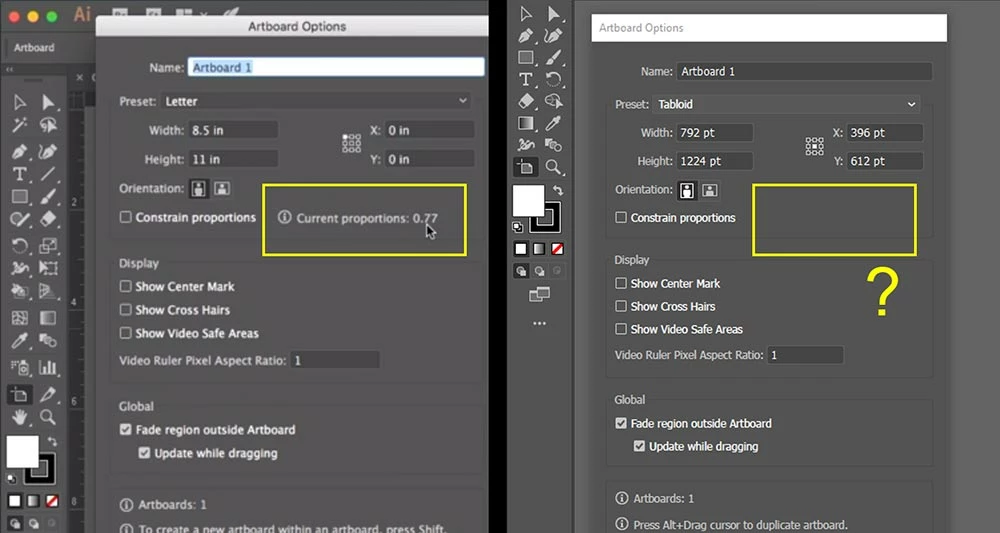
Why is "Current proportions" option missing from Illustrator CC 2019?
  • March 27, 2019
  • 4 replies
  • 571 views

LEFT (Screenshot from a tutorial): The "Current proportions" option is visible under Artboard Options window.

RIGHT (Screenshot from my desktop): The "Current proportions" is missing.

Please let me know how to enable this option.

This topic has been closed for replies.

4 replies

Legend
March 23, 2020

As Monika and Doug have confirmed you, that info was dropped off some versions ago.


cdMn has informed you that value showed the width to height ratio of the artboard.


While the checkmark at left Constrain Proportions, that shows a chain between width and height when is checked on, keeps the ratio w/h, and allows to increase e.g. the width by a certain amount  (+120pt) or a percentage (*1,25) and increasing the height proportionally, keeping their ratio or proportions.

Participant
March 23, 2020

Just divide wide by height and you will get the current proportions! 

Doug A Roberts
Community Expert
Community Expert
March 28, 2019

It's present in CS6, but not in CC 2018 or 2019. That screenshot on the left looks like a later version than CS6, so it was presumably dropped in an earlier CC version.

Monika Gause
Community Expert
Community Expert
March 27, 2019

On the forums we can't tell you why it's not there (because we don't know either), but if you need it, please post to http://illustrator.uservoice.com