
Participant
May 22, 2018 1:17 AM UTC
Answered

Why is my hex color code gone in color mixer?

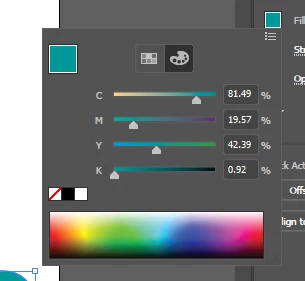
Why is my hex color code gone in color mixer? Before, when I wanted to change the color of an object I would go to the Appearance panel on the right side of the screen then to Fill and to the Color Mixer tab (The color palette as seen in the picture). In the tab it would show RGB and the color hex code. How can I get that back?
This topic is closed to new replies. Start a new post to keep the conversation going.
rcraighead
rcraigheadCorrect answer
Legend
May 22, 2018 2:51 AM UTC

Because you're in CMYK. Click the flyout menu (top right) and choose RGB.

3 replies

rcraighead
rcraigheadCorrect answer
Legend
May 22, 2018 2:51 AM UTC

Because you're in CMYK. Click the flyout menu (top right) and choose RGB.

Translate
Participant
Feb 27, 2023 8:06 PM UTC

Which is completely logical, to click RGB for HEX to be shown. I mean it's not like they're completely different color systems. HEX is in fact a nick name for RGB. H stands for Hadobe Red, E stands for Grein and X stands for Blex. Adobe

Translate
Monika Gause
Community Expert
Community Expert
Feb 27, 2023 8:45 PM UTC

@Dragan28619945374p  schrieb:

HEX is in fact a nick name for RGB. 


Not quite:

  • Hex is a 6-digit, 24 bit, hexidecimal number that represents Red, Green, and Blue. An example of a Hex color representation is #123456, 12 is Red, 34 is Green, and 56 is Blue. There are 16 million possible colors.


Quoted from https://www.hexcolortool.com/ 

Translate