@Cristy5EB2 I just got confirmed that it can be reproduced on Windows in the current 30.8.1 Illustrator version. Can you report this bug (with a link to this discussion) on UserVoice?: https://illustrator.uservoice.com/
my screenshots attached below are from Illustrator 30.8.1, M4 Max on Tahoe 26.6.2. As I said the only way to remove the image editing panels I can find is to uncheck “Image” from the panel settings, which removes all info related to the image, including PPI
The face that the Edit in Firefly button only works when a JPEG/PNG is selected feels like a huge space waster as someone normally works with PSDs in Illustrator rather than flat raster images. Then given the fact that it then has to hide PPI and color space behind a click just makes even less sense.
Why not make a dedicated button to open a selected image/PSD in Photoshop, a dedicated photo editor, instead of 5 different buttons for Firefly. Is that crazy??
All of the quick action tools when selecting an image are also available when directly right clicking that image. We should have the option to remove certain image quick actions on the properties panel so that they do not affect other parts of the panel. Nearly half of the panel is taken up by image adjustments, 3 of which are newer AI powered features (Edit in Firefly, Remove Background, Concept to Vector).
I too noticed what you did and am annoyed there is no way to customize the image quick actions; they all fall under “image” on the dock menu, including PPI. Having some customization would, unsurprisingly, improve my user experience!
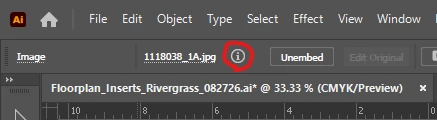
@Cristy5EB2 Which version do you use and what system? Is there enough space in the Control bar to show it? If not try to hide some items in the options.
30.8.1 and yes, plenty of room. It just changed with one of the most recent updates and it’s something I use in my job daily. While there are other ways to see it, this was the #1 most convenient of options and I want it back! BOO!
I have the same exact issue, and I used it on every job I open! I want it back too. I was hoping that you would find the solution. And why would they change that anyway?



 AdChoices