WanderElla
Inspiring
July 14, 2020
Answered

Why my Adobe Illustrator slow/quits in opening files & moving/copying with more than 10 artboards?

  • July 14, 2020
  • 2 replies
  • 655 views

Why is my Adobe Illustrator slow/quits in opening files & moving/copying items with more than 10 artboards?

The file is 1GB and when I open it, my illustrator always crashes or quits or stops working.
The other file is 890MB.

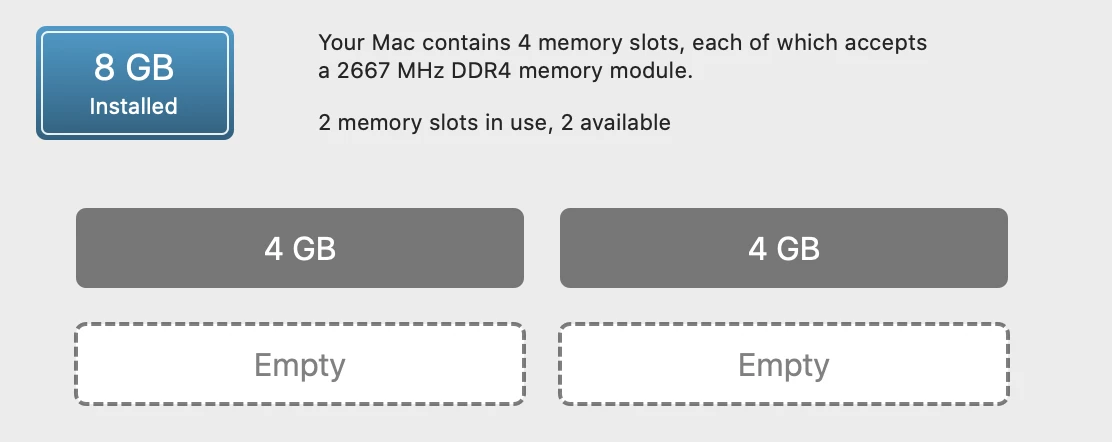
Is there a problem with my ram?
If I upgrade it, will it fix my problem?
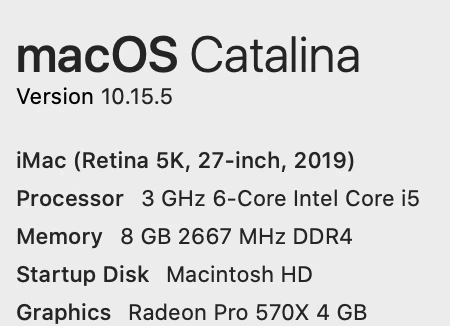


I only open Adobe Illustrator, Google Chrome, WhatsApp, and Spark. I usually close them after I got what I need so only Illustrator is left. 

This topic has been closed for replies.
Correct answer Monika Gause

8 GB of memory is just barely the minimum.

https://helpx.adobe.com/illustrator/system-requirements.html

2 replies

Monika Gause
Community Expert
Monika GauseCommunity ExpertCorrect answer
Community Expert
July 14, 2020

8 GB of memory is just barely the minimum.

https://helpx.adobe.com/illustrator/system-requirements.html

WanderElla
Inspiring
July 19, 2020

Thank you so much. I am planning on upgrading to add 2 more 16GB RAM. I will update you once resolved.

italosan
Community Expert
Community Expert
July 14, 2020

Hi, could you tell us where your files are saved? Support for external memory or on your iMac?

WanderElla
Inspiring
July 19, 2020

It's save it the desktop. No support for external memory.