Participating Frequently
December 28, 2017
Answered

why my live trace is not working

  • December 28, 2017
  • 3 replies
  • 2343 views

I actually placed a PSD file in adobe illustrator and I m trying hard to remove the white background. but the live trace is not enabling. whats wrong??

This topic has been closed for replies.
Correct answer Ton Frederiks

View > Image Trace

Click Advanced and check "Ignore White"

For more options ee also: How to edit artwork in Illustrator using Image Trace
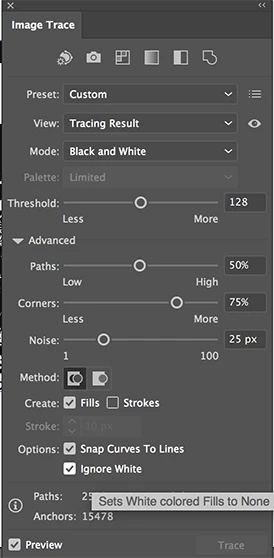
3 replies

Ton Frederiks
Community Expert
Community Expert
December 28, 2017

Live Trace is from an old version.

Are you sure your Illustrator version is supported by your System?

Participating Frequently
December 28, 2017

M having cs6 version. I was practicng through tutorial for the first time

Monika Gause
Community Expert
Community Expert
December 28, 2017

  schrieb

M having cs6 version. I was practicng through tutorial for the first time

What exactly are you doing step by step?

Plese show a screenshot of the issue.

Monika Gause
Community Expert
Community Expert
December 28, 2017

Which version, which system?

Please describe what exactly you are doing step by step?

What happens exactly? "Not working" is inprecise.

mcsousah
Participating Frequently
December 28, 2017

strange, have you tried to open the PSD file with the Illustrator?

Also why don't you try to clean the background originally from the Photoshop or to export it within transparent background?

Thanks