TypoMan23
Known Participant
September 29, 2022
Answered

Why no AI icon branding for file on my desktop?

  • September 29, 2022
  • 3 replies
  • 3057 views

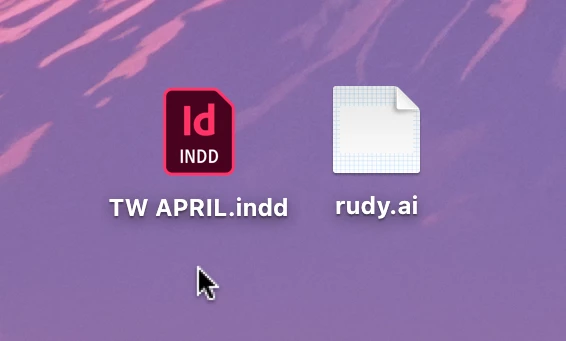
I am new-ish to CC. I just noticed that a recent AI file (I hardly use AI) on my desktop does not have the AI 'branding', whereas all my ID files do. 

Why is this so? Thank you.
 

This topic has been closed for replies.
Correct answer Disposition_Dev

When possible, OSX tries to show you a preview of the document inside the icon on your desktop. The reason your rudi.ai icon looks empty is likely because there's nothing on the artboard and therefore nothing to display except a white background.


I'm not sure how to disable this.. But i find it helpful, to be honest. You can witness this behavior change by updating the extension from ".ai" to ".ait" to make it a template file. the preview will disappear and it will be replaced by the illustrator logo instead.

3 replies

Disposition_Dev
Disposition_DevCorrect answer
Legend
September 30, 2022

When possible, OSX tries to show you a preview of the document inside the icon on your desktop. The reason your rudi.ai icon looks empty is likely because there's nothing on the artboard and therefore nothing to display except a white background.


I'm not sure how to disable this.. But i find it helpful, to be honest. You can witness this behavior change by updating the extension from ".ai" to ".ait" to make it a template file. the preview will disappear and it will be replaced by the illustrator logo instead.

Doug A Roberts
Community Expert
Community Expert
September 30, 2022

That just crossed my mind, but I don't have my Mac handy to check. Files with PDF compatibility should display a thumbnail.

Anubhav M
Community Manager
Community Manager
September 29, 2022

Hello @TypoMan23,


Thanks for reaching out. Would you mind logging in to the root user account and checking if it works? If yes, kindly try the suggestions shared in this Apple Support post (https://discussions.apple.com/thread/8418684) to reset Finder, restart your computer and share your observations.


Looking forward to your response.


Thanks,

Anubhav

TypoMan23
TypoMan23Author
Known Participant
September 30, 2022

Thanks for the reply.
This all seems too complicated and technical for me.
I just simply want to know why it's not working, and why no AI icon is showing up for the file on the desktop. I am new to CC and this should be working as I have only had CC for barely one month... isn't there a simple setting I can check to ensure that it works?

Doug A Roberts
Community Expert
Community Expert
September 30, 2022

Does the file open in AI if you double-click on it?

The missing icon is not an issue with Illustrator, but with the Mac OS. Therefore, if you really want to solve it you may have to delve into Mac OS troubleshooting.

Doug A Roberts
Community Expert
Community Expert
September 29, 2022

What is the file association (Open with...) in the file info?

TypoMan23
TypoMan23Author
Known Participant
September 29, 2022

Open with:

Adobe Illustrator 2022 (default)