Known Participant
October 22, 2024
Question

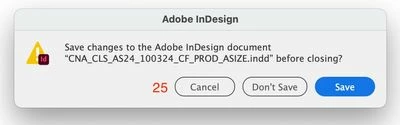
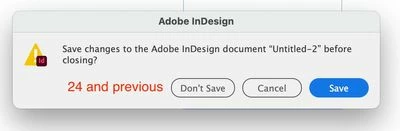
Why were the "cancel" and "don't save" buttons swapped for Adobe '25 products?

  • October 22, 2024
  • 2 replies
  • 1004 views

Why were the "cancel" and "don't save" buttons swapped for Adobe '25 products? Why was this switch made? Makes no sence. I am having to unlearn 25+ years of muscle behavior. Why Why Why! 


This topic has been closed for replies.

2 replies

Participating Frequently
November 6, 2024

Thanks for confirming that these buttons are indeed swapped. I thought it was me going mad.

Please, Adobe put the buttons back. This change makes absolutely no sense.


Monika Gause
Community Expert
Community Expert
November 6, 2024

@Magnus Gaarde  schrieb:

Thanks for confirming that these buttons are indeed swapped. I thought it was me going mad.

Please, Adobe put the buttons back. This change makes absolutely no sense.


They have not been swapped in Illustrator and this is the Illustrator forum.

Generally: in this forum 95% of people are not staff. We cannot change the product. If you want to address the engineers, for Illustrator and InDesign, please use Uservoice

Vote for this: https://indesign.uservoice.com/forums/601180-adobe-indesign-bugs/suggestions/48997439-why-were-the-cancel-and-don-t-save-buttons-swa

Participating Frequently
November 6, 2024

OK, Thanks.

Monika Gause
Community Expert
Community Expert
October 22, 2024

I believe you could get a better response and reach the relevant people if you post this either in the InDesign forum or the InDesign Uservoice. https://indesign.uservoice.com

Known Participant
October 22, 2024

The same button swap applies for all adobe products that I've tried thus far. Photoshop, illustrator, indesign. I didn't take pictures of each one specifically as it's relevant for all. 

Ton Frederiks
Community Expert
Community Expert
October 22, 2024

In Illustrator 2025 they are still the same as in 2024