


Participant
December 26, 2025
Question

Width profile not smooth

  • December 26, 2025
  • 3 replies
  • 514 views

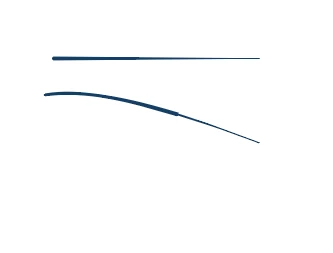
I changed the width profile to my paths to the tringle shape, some of my paths are reacting normally (see top line) and some are changing to a sharp change in width. To clarify they are both on the same width profile.
26889537-9330-41ea-9112-9f4c2c0e70b3.png

I can't see that they're in any way different too each other in properties or in the layers, but I assume they must be somehow, anyone know why or how to fix?

3 replies

Ares Hovhannesyan
Community Expert
Community Expert
December 27, 2025

Cant Reproduce your artifact in latest Illustrator. What happens if you increase stroke width?

kate_0416Author
Participant
December 28, 2025

kate_0416_0-1766917529331.png

Its the same just thicker

Monika Gause
Community Expert
Community Expert
December 26, 2025

Can you share the file?

Change the file extension to PDF, then you can upload it in this forum.

kate_0416Author
Participant
December 28, 2025
Tuna_with_odd_lines.pdf
Jacob Bugge
Community Expert
Community Expert
December 28, 2025

Clicking the link gives an error message,


"Document preview of Tuna with odd lines.pdf
Error displaying attachment content"


Jacob Bugge
Community Expert
Community Expert
December 26, 2025

Kate,


Maybe far too far out, but what happens if you hold Ctrl/Cmd and press E?


This toggles between GPU and CPU, the former sometimes being a bit unruly. You can untoggle if the issue remains.


This is what GPU is about:
https://helpx.adobe.com/illustrator/kb/gpu-performance-preview-improvements.html


GPU is faster, sometimes too fast, so it gets ahead of itself and moves in mysterious ways.


kate_0416Author
Participant
December 28, 2025

Nope, doesn't seem to do anything